标签 css3 下的文章

直接上代码了,只是为了记录一个自己常用的示例:

  • GooglePlus
  • LinkedIn
  • Picasa
  • Wikipedia

HTML 代码

<ul class="actions-list">  
    <li class="action-item facebook">
        Facebook
    </li>
    <li class="action-item google">
        GooglePlus
    </li>
    <li class="action-item linkedin">
        LinkedIn
    </li>
    <li class="action-item picasa">
        Picasa
    </li>
    <li class="action-item twitter">
        Twitter
    </li>
    <li class="action-item wikipedia">
        Wikipedia
    </li>
</ul>

CSS 代码

/* Flex box define */
.actions-list {
    display: -webkit-box;
    display: -webkit-inline-flex;
    display: -moz-inline-flex;
    display: -ms-inline-flexbox;
    display: inline-flex;  
}

.actions-list .action-item {
    -webkit-box-flex: 1;
    -webkit-flex: 1 1 auto;
    -moz-flex: 1 1 auto;
    -ms-flex: 1 1 auto;
    flex: 1 1 auto;

    -webkit-transition: all 300ms ease;
    -moz-transition: all 300ms ease;
    -o-transition: all 300ms ease;
    transition: all 300ms ease;

    -webkit-box-sizing: border-box;
    -moz-box-sizing: border-box;
    box-sizing: border-box;

    overflow: hidden;
}

/* Design: widths, colors, borders, etc... */
.actions-list {
    margin: 0;
    padding: 0;
}
.actions-list .action-item {
    font-family: Helvetica, Arial, sans-serif;
    font-weight: lighter;
    cursor: pointer;
    background-color: #66bbcc;
    border-left: 1px solid rgba(0, 0, 0, 0.2);
    color: #000000;
    padding-left: 52px;
    background-repeat: no-repeat;
    background-position: left 10px center;
    background-size: 32px;
    line-height: 52px;
    height: 52px;
    max-width: 50px;
}
.actions-list .action-item:hover {
    max-width: 150px;
    background-color: #ff9966;
    padding-right: 10px;
}
.actions-list .action-item:first-child {
    border: none;
}

.facebook {
    background-image: url(https://pub.ofcrab.com/usr/uploads/2016/06/3022132263.png);
}
.google {
    background-image: url(https://pub.ofcrab.com/usr/uploads/2016/06/3814450726.png);
}
.linkedin {
    background-image: url(https://pub.ofcrab.com/usr/uploads/2016/06/650013350.png);
}
.picasa {
    background-image: url(https://pub.ofcrab.com/usr/uploads/2016/06/887720659.png);
}
.twitter {
    background-image: url(https://pub.ofcrab.com/usr/uploads/2016/06/1628655408.png);
}
.wikipedia {
    background-image: url(https://pub.ofcrab.com/usr/uploads/2016/06/305452685.png);
}

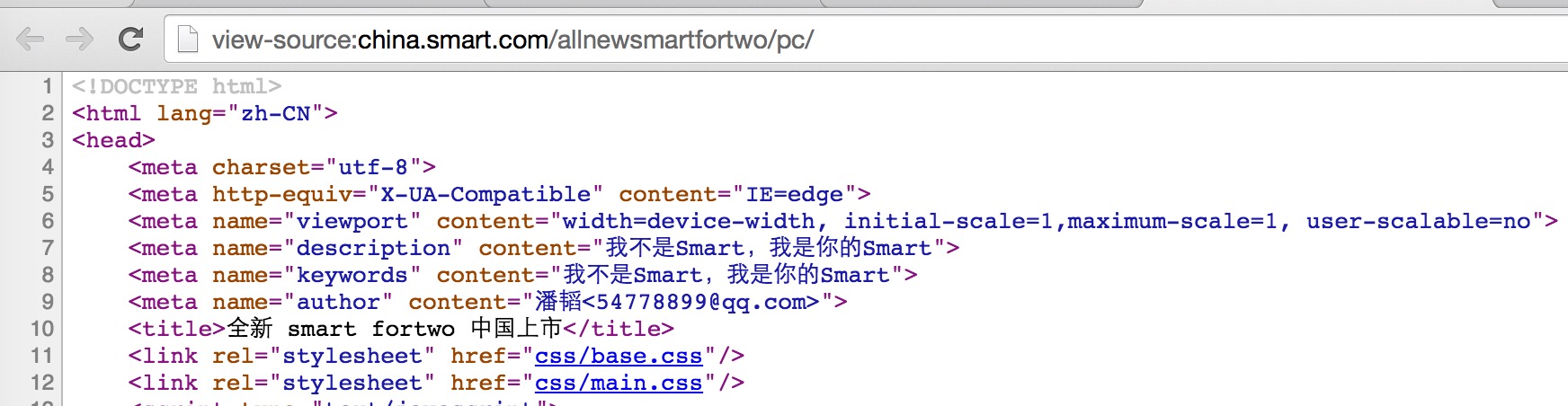
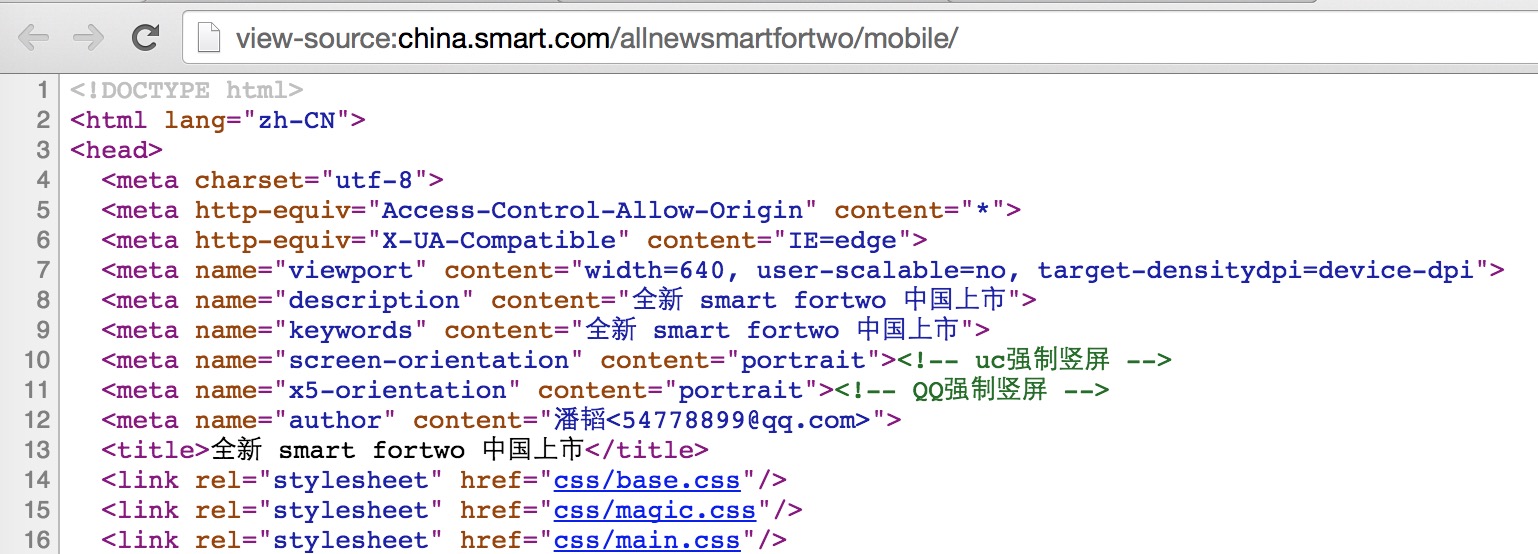
七月份的下半个月,有幸做了奔驰 Smart 2015年新官网,包括手机端和PC端的宣传页,地址:

这里,为了证明这个是一个事实,我还特意的留存了两张截图:

QQ20150802-1@2x.jpg

QQ20150802-2@2x.jpg

这里只想说明这么几个问题:

  1. 这东西确实是我做了,而且是那种创意95天,开发两天,三天测试,100天的时候就要上线的;
  2. 奥美负责创意,把项目外包,结果就是,丫的居然告诉我,不合格,准备直接把代码转交给另外一个团队,意思就是这项目跟我没半毛钱关系;
  3. 这是纯粹对劳苦码农工作成果的蔑视,本人发誓,老子有生之年,再也不会跟任何外企扯上关系,即使被国人坑,至少不流外人田;
  4. 大家以后跟这两公司打交道,小心……切记

抵制奥美,从我做起

抵制奔驰,人人有责

吐槽过程中随便写了点东西,可以很多地方欠周全,不过差不多吧应该。

这么久以来,我听着最恶心的就是H5这两个字符,H5是什么?它是 HTML5 ,也就是 HTML 第五版在中国的IT圈里面的一种缩写,最开始是因为淘宝,腾讯等大公司将自己的以前的 wap 与 3g 网站(也就是3G时代以前手机端的网站,使用的是简化的HTML技术)改成 h5 网站,二级域名使用的是 h5.xxx.com 这种的,人家的意思是”这是一个基于 HTML 5 技术的网站“,就像以前的这是一个基于 WAP 技术的网站是一个意思,但是,中国的IT人总是会创出很多”有意思“的行话来,比如,H5,但是,那我们暂且认同这种说法吧,暂且把 H5 定义为 HTML5 的简称,那我们来看看 HTML5 是什么?

HTML5是HTML最新的修订版本,2014年10月由万维网联盟(W3C)完成标准制定。目标是取代1999年所制定的HTML 4.01和XHTML 1.0标准,以期能在互联网应用迅速发展的时候,使网络标准达到符合当代的网络需求。广义论及HTML5时,实际指的是包括HTML、CSS和JavaScript在内的一套技术组合。它希望能够减少网页浏览器对于需要插件的丰富性网络应用服务(Plug-in-Based Rich Internet Application,RIA),例如:Adobe Flash、Microsoft Silverlight与Oracle JavaFX的需求,并且提供更多能有效加强网络应用的标准集。

具体来说,HTML5添加了许多新的语法特征,其中包括 <video><audio><canvas>元素,同时集成了SVG内容。这些元素是为了更容易的在网页中添加和处理多媒体和图片内容而添加的。其它新的元素如<section><article><header><nav>则是为了丰富文档的数据内容。新的属性的添加也是为了同样的目的。同时也有一些属性和元素被移除掉了。一些元素,像<a><cite><menu>被修改,重新定义或标准化了。同时APIs和DOM已经成为HTML5中的基础部分了。HTML5还定义了处理非法文档的具体细节,使得所有浏览器和客户端程序能够一致地处理语法错误。

上面这两段是引用自维基百科的解释,其实说白了,HTML5就是提供了更多特性的 HTML。那我们再来看 HTML 是什么,还是引用维基百科的解释:

超文本标记语言(英文:HyperText Markup Language,HTML)是为“网页创建和其它可在网页浏览器中看到的信息”设计的一种标记语言。HTML被用来结构化信息——例如标题、段落和列表等等,也可用来在一定程度上描述文档的外观和语义。1982年由蒂姆·伯纳斯-李创建,由IETF用简化的SGML(标准通用标记语言)语法进行进一步发展的HTML,后来成为国际标准,由万维网联盟(W3C)维护。 HTML档案最常用的扩展名(扩展名)为.html,但是有如DOS等的旧操作系统限制扩展名最多为3个文字符号,所以.htm扩展名也允许使用。而如今.htm扩展名的使用较为减少。

编者可以使用任何基本的文本编辑器(例如Notepad等)或所见即所得的HTML编辑器来编辑HTML文件。 早期的HTML语法规则定义较为松散,这有助于不熟悉网络出版的人使用或变更。网页浏览器接受这类的文件,使之可以显示语法不严格的网页。随着时间的流逝,官方标准渐渐趋于严格的语法,但是浏览器继续显示一些仍不合乎标准的HTML。使用XML的严格规则的XHTML(可扩展超文本标记语言)是W3C计划中的HTML的接替者。虽然很多人认为它已经成为当前的HTML标准,但是它实际上是一个独立的、和HTML平行发展的标准。W3C目前建议使用XHTML 1.1、XHTML 1.0或者HTML 4.01标准编写网页,但已有许多网页转用较新的HTML5编码撰写(如Google)。

不知道说到这里各位理解HTML5和HTML了没,如果没有理解,可以想想下面这种场景:

XX写一篇文章,发布到网站上面去,文章嘛,有标题,有摘要,有段落,有列表,还有可能有插图,但是这个该怎么写呢?我得让浏览器知道哪些是标题,哪些又是段落,哪些又是列表嘛,怎么办?这个时候可以先告诉浏览器,我用HTML标准来写文章吧,你就按HTML的标准来理解我给你的数据就可以了,所以,大家可以看到,任何一个网页的源代码的第一行都是声明,我这是一个HTML文档,而且,还申明到了,我这个文档用的是什么版本的HTML,比如,我们以前用得最多的:

<!DOCTYPE html PUBLIC "-//W3C//DTD XHTML 1.0 Transitional//EN" "http://www.w3.org/TR/xhtml1/DTD/xhtml1-transitional.dtd">

上面这一行告诉我们,我这个文档是HTML文档,遵守的是 XHTML 1.0 版本的协议,而且不需要很严格的执行这个标准备(Transitional说明的),若你(指的是浏览器)不知道我这个版本的HTML的协议(就是规范)是什么样儿的时候,你可以下载http://www.w3.org/TR/xhtml1/DTD/xhtml1-transitional.dtd这个文件,这个文件会告诉你,我的具体规范是什么。

而当我们用HTML5之后,改变的第一个就是上面这一行,我们不再需要按上面这样写了,就按下面这样写就可以了:

<!DOCTYPE html>

简单吧,就告诉你,我是HTML文档,对于低版本的浏览器,他们会选择一个自己支持的最新的HTML规范去解释这份文档,而对于支持HTML5标准的浏览器,就会直接按HTML5规范来解释了。

然后,不是有一个标题嘛,标题在HTML里面共分为六级,就是 h1,h2,h3,h4,h5,h6,看到没?h5,这个在HTML里面表示的是第五级标题,而如果你在HTML里面没有出现 H1,h2,h3,h4 的话,是不允许直接出现 h5 的,若就只是一篇文章,我们就应该直接使用 h1,所以,吐槽杂志这四个字在HTML里面是这样的:<h1>吐槽杂志</h1>,然后就是段落了,那是 p 干的活,表示,被我包着的文本是一个段落,比如:<p>我是一个段落</p>,同样的,列表有 ul ,即 unordered list,意思为无顺序的列表,ol,即 ordered list,意思是有顺序的列表,比如下面这样的一个示例,要做黄焖鸡要有几步?看下面这几步:

<ol>
    <li>杀鸡</li>
    <li>开火</li>
    <li>焖煮</li>
</ol>

上面这五行,浏览器看到之后,就会知道了,哦,这是一个有序列表,那有序列表该这么显示(说一下,li 不读李,而是 list item,即列表项):

1. 杀鸡
2. 开火
3. 焖煮

看到没,HTML里面其实就是通过各种各样的标签来标记不同意义的内容而已,到现在为止,我还只是说到了 HTML,CSS和JS都还没有涉及,如果没有CSS和JS,HTML的网页在浏览器里面看起像下面这样的:
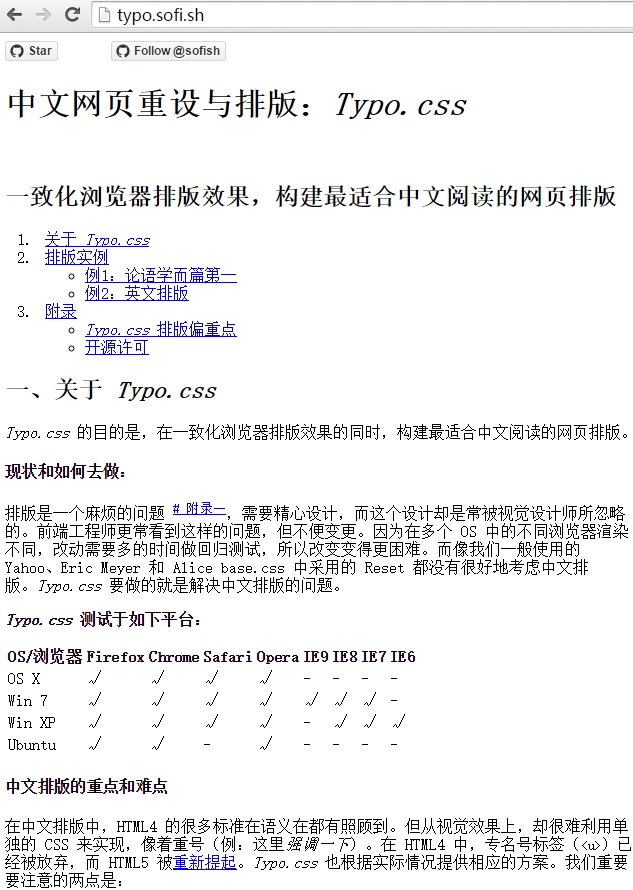
4693194F-B64E-49A8-94BE-D0B0359BFAC0.png

是不是很丑,其实这个就是HTML在浏览器里面的表现,而为什么有的字体大一点,有的黑一点,有在粗一点,那是因为浏览器通过对HTML结构的解析,然后知道不同的文本都表示的不同的意义的,比如最上面的”中文网页重设与排版:Typo.css“这一段,它是 h1 标签,一级标题,也就是一个网页里面权重最高的文本,所以,它认为应该字体大一点,粗一点,颜色深一点,我们把同样的一份没有CSS和JS的HTML文档放在不同的浏览器里面打开,显示的效果也是不一定一样的,这是因为,我认为 20号字体最能表示 h1,但是可以你却认为24号才行,但是大家基本上的理解也都还差不多,但是虽然差不多,也还是有差异,这个差异,就是所谓的浏览器兼容性(仅仅只是HTML层的,相应的CSS与JS也有兼容性问题),对同样的事物的理解不一样,才是导致兼容性存在的根本原因,但是,兼容性没关系,也都是有解决办法的。

然后,随着互联网的发展,越来越多的人感觉,我们是不是可以让网页文档(HTML文档)更加漂亮一点,这个时候,有一些NB的人就走到了一起,想到了CSS:

层叠样式表(英语:Cascading Style Sheets,简写CSS),又称串样式列表、级联样式表、串接样式表、层叠样式表、階層式樣式表,一种用来为结构化文档(如HTML文档或XML应用)添加样式(字体、间距和颜色等)的计算机语言,由W3C定义和维护。目前最新版本是CSS2.1,为W3C的推荐标准。CSS3现在已被大部分现代浏览器支持,而下一版的CSS4仍在开发过程中。

根据上面的这个解释,应该明白了吧,HTML太丑了,那我就用CSS来样式化他,你把我现在不管你认为H1 应该是多大的字体,反正我告诉你了,我这个文档,H1必须显示成 30号字体,你把你们自己的想法都别体现出来,听我的就成了,我就是想让我的读者看到 30 号字体大号的标题,那我们怎么做了,只要下面这样斥可以了:

h1 {
    font-size: 30pt;
}

这个时候,浏览器就会拿我定义的规则覆盖他们各自自己的规则了,最后字体显示成了 30号字体,同样的,除了字体大小,CSS还提供了很多很多的选择器(用来指定哪一个HTML元素的),用来定义几乎所有的HTML元素,还提供了很多的关于样式的描述,比如 颜色:color,字体:font-family,背景色:background-color等等,通过CSS,让我们可以把一份特别特别丑陋的HTML文档变得更加美观,也正是这个时候,才出现的一个新的工种,网页设计师,因为只有在存在一种技术美化网页的时候,网页设计师才能把自己的想法变成现实,这个时候,那一群工作在网站技术一线的人就分为了网页美工(对网页进行简单的设计和把设计转成HTML+CSS)和后台程序两种,记着,这个时候还没有称之为前端,而我有幸,正好是从那个时代就接触了互联网(04年了解,05年入行)。那是 Web 1.0 时代,再发展,网民越来越多,想法也越来越多,他们不再只是想着看,还想着,我看了之后是不是可以告诉你我的读后的感受?我是不是可以参与到你的话题里面去?慢慢地,这种想法被大家都认同之后,可以让访问者留言的网站出现了,这个时候,网站与读者间有了简单的交互,我写了一篇《怎么做黄焖鸡》的文章,然后有一个读者不认同我的这种做法,就可以在文章最下面的留言框里面写上自己的想法,然后点击提交,然后,他说的话,别的读者也可以看得到,然后别的读者可能又有别的想法,他们也同样可以接着在下面写上自己的想法,这个时候,BBS、博客们就出现了(我这里所说的只是网页上的BBS,其实BBS出现得更早,只是不是以网页的形式出现而已),再接着往下发展,就只是发发评论还是不行啊,那么网站主们为了方便访问者更好的参与交流中来,就想出了各种各样的方法,而最简单的方法就是让死气沉沉的网页动起来,那么,引出了JavaScript了:

JavaScript,一种直译式脚本语言,是一种动态类型、弱类型、基于原型的语言,内置支持类。它的解释器被称为JavaScript引擎,为浏览器的一部分,广泛用于客户端的脚本语言,最早是在HTML网页上使用,用来给HTML网页增加动态功能。然而现在JavaScript也可被用于网络服务器,如Node.js。在1995年时,由网景公司的布兰登·艾克,在网景导航者浏览器上首次设计实现而成。因为网景公司与昇阳公司合作,网景公司管理层次结构希望它外观看起来像Java,因此取名为JavaScript。但实际上它的语义与Self及Scheme较为接近[4]。为了获取技术优势,微软推出了JScript,与JavaScript同样可在浏览器上运行。为了统一规格,1997年,在ECMA(欧洲计算机制造商协会)的协调下,由网景、昇阳、微软和Borland公司组成的工作组确定统一标准:ECMA-262。因为JavaScript兼容于ECMA标准,因此也称为ECMAScript[5]。

上面的定义可能有一些拗口,简单来说,JavaScript可以在浏览器里面运行,运行之后可以产生各种各样的动作,比如让一个标题从左向右走着跑马灯,而不再是定在那里不动等等,这个时候的网页越来越有趣味,以前可能就是在文章的最下面有一个评论框,但是现在却不一样了,文章最下面就一个“点我打开评论框”,然后用户点一下,就在网页里面弹出一个对话框来,用户可以在对话框里面输入内容,然后点击确定,就添加好评论了,这样一来,网页的读者参与感越来越强,再往后发展,才产生一个新的工种 ,用户体验设计师,他们是一群研究与提升读者在你的网页里面的感受的,再往后发展为交互体验设计师(就是我们Ocean的工种),但是交互体验只是在想各种各样的办法和理论来告诉你,怎么做更好,但是他们本身却并不会做,比如,Ocean告诉你:当网页往下翻到第500像素的位置的时候,叮当猫从网页的左边跳出来,然后出来一个气泡,里面一个一个字的出现一句话:大家好,我叫呆小当。

那么,什么人去把这种想法付诸实现呢?前端,那我们应该知道前端干的活儿了吧,前端就是把前端设计师、交互设计师的各种各样的想法变成实际的实现的人,那前端具体要怎么实现上面的那个想法呢?下面这样的:

写一个JS程序,这个JS程序要监听这么几件事情:a) 网页现在在什么位置? b) 若滑动到 500 的话,让叮当猫从左边跳出来,然后出来一个气泡……

但是JS要怎么实现这些动效?它用到了CSS,前面说过CSS是用来样式化HTML文档的,怎么用?先用CSS把叮当猫在网页里面隐藏,比如下面这样的:

.doraemon-cat {
    display: none
}

这个表示,.doraemoney-cat 这个名字的图片,它的展示方式(display)为 不显示(none,即什么也没有)

然后当网页滑动到 500 px 的时候, js 通过 css 把这个图片的 display 属改成 block(以以块显示)

然后再控制其它的如文字出来哪之类的。

知道没,前端需要的技能是HTML+CSS+JavaScript这三种技术的完美配合才能达到最佳效果的,所以,当大家尤其是某某自己在说自己是做前端的的时候,我就只有在心里呵呵一声了,而这个也正是我本来来这里应该做的事情,将交互设计师的创业与想法通过HTML+CSS+JavaScript变成实现。一个不会JS,一个不会CSS,三条腿能稳当,少一条怎么可能站得起来?即使站起来了,随便小风小浪一吹一打就倒了,这也就是为什么我们现在的整个前端架构为什么这么脆弱的原因了。

那么,我们为什么前端又有兼容性呢?其实原因还是因为浏览器对同样的东西的理解不一样导致的,比如,js 里面 alert 这个东西,在 IOS 的浏览器里面显示成半透明的白色,而Android可以显示成半透明的黑色,这就是兼容性,但是并没有谁对谁错,只是理解不一样而已,但是,但是,又但是,对各种不同环境下对同样的东西作出不一样的解释这种现象,说成无法解决的问题,我就只能哈哈一下了。

有兼容性本身并不可怕,我们可以尽可能的少用那些有兼容性问题的特性,或者我们可以很明确的为不同的浏览环境做不同的处理,但是,一般情况下,都不可能出现,IOS 有,Android却没有的特性,也就是说,不管是什么功能,只要是HTML有的特性,那么浏览器里面一般都会有,只要是CSS里面有的特性,各种不同的浏览器里面也一般都会有,JS也一样,只是解释不太一样,我们在完成一个作品(我叫完成一个作品,而不是完全一个任务)的时候,用一个很简单的规避方式就能避免这些问题,但是,现在我们有的人的做法是,自己不知道这里面的异同,然后以自己浅薄的那一点点知识来告诉更加不懂的人:这就是这样的,没有办法,技术是实现不了的,就有点儿让人接受不了了,这让我想起去年,我在学习一个叫作 Ionic 的新技术的时候,在Android里面,导航条就是跑在屏幕的最上面,而在 iOS 的时候,就是我想要的,导航条在下面,我当时在网上各种圈子里面各种吐槽,说一个这么成熟的框架居然还有这种Bug,犯这种SB错误,然而,某一天,当我很仔细的翻看了人家官方的文档之后,我瞬间就想往地缝里钻,人家说得很明白,系统在 Android 环境下,默认导航条在上面,iOS 下,默认导航条在下面,若要在修改默认设置,只需要设置:

navigator.position = "bottom"或者 "top" 即可,

而我现在对于某些人的想法就是这样的,………………
http://segmentfault.com/ 上面看到的问题,回答了之后,人家才告诉我问的不是CSS相关的,所以,实现方式就放在这里了吧:


<!DOCTYPE html>
<html lang="zh-CN">
<head>
    <meta charset="utf-8"/>
    <title>纯CSS实现的手表</title>
    <style>
        @keyframes tik {
            from {
                transform:rotate(0deg);
                -ms-transform:rotate(0deg);
                -moz-transform:rotate(0deg);
                -webkit-transform:rotate(0deg);
                -o-transform:rotate(0deg);
            }
            to {
                transform:rotate(360deg);
                -ms-transform:rotate(360deg);
                -moz-transform:rotate(360deg);
                -webkit-transform:rotate(360deg);
                -o-transform:rotate(360deg);
            }
        }

        @-moz-keyframes tik {
            from {
                transform:rotate(0deg);
                -ms-transform:rotate(0deg);
                -moz-transform:rotate(0deg);
                -webkit-transform:rotate(0deg);
                -o-transform:rotate(0deg);
            }
            to {
                transform:rotate(360deg);
                -ms-transform:rotate(360deg);
                -moz-transform:rotate(360deg);
                -webkit-transform:rotate(360deg);
                -o-transform:rotate(360deg);
            }
        }

        @-webkit-keyframes tik {
            from {
                transform:rotate(0deg);
                -ms-transform:rotate(0deg);
                -moz-transform:rotate(0deg);
                -webkit-transform:rotate(0deg);
                -o-transform:rotate(0deg);
            }
            to {
                transform:rotate(360deg);
                -ms-transform:rotate(360deg);
                -moz-transform:rotate(360deg);
                -webkit-transform:rotate(360deg);
                -o-transform:rotate(360deg);
            }
        }

        @-o-keyframes tik {
            from {
                transform:rotate(0deg);
                -ms-transform:rotate(0deg);
                -moz-transform:rotate(0deg);
                -webkit-transform:rotate(0deg);
                -o-transform:rotate(0deg);
            }
            to {
                transform:rotate(360deg);
                -ms-transform:rotate(360deg);
                -moz-transform:rotate(360deg);
                -webkit-transform:rotate(360deg);
                -o-transform:rotate(360deg);
            }
        }
        #clock {
            width: 200px;
            height: 200px;
            background: #f0f0f0;
            border: 1px solid #ccc;
            border-radius: 50%;
            position: relative;
        }
        #pointer {
            width: 10px;
            height: 10px;
            background: #e0e0e0;
            border: 1px solid #ccc;
            border-radius: 50%;
            position: absolute;
            top: 50%;
            left: 50%;
            margin-top: -5px;
            margin-bottom: -5px;
            animation: tik 60s;
            -moz-animation: tik 60s;
            -webkit-animation: tik 60s;
            -o-animation: tik 60s;
        }
        #pointer:before {
            content: "";
            display: block;
            height: 95px;
            width: 2px;
            background: #282828;
            position: absolute;
            bottom: 100%;
            left: 50%;
            margin-left: -1px;
        }
    </style>
</head>
<body>
<div id="clock">
    <div id="pointer"></div>
</div>
</body>
</html>

点击下面这个网址还可以看运行效果:

https://pub.ofcrab.com/usr/sandbox/html5/css3-clock/www/index.html

@charset "utf-8";

/**
 * iPhone 4/4s landscape & portrait
 */
@media only screen
and (min-device-width: 320px)
and (max-device-width: 480px)
and (-webkit-device-pixel-ratio: 2)
and (device-aspect-ratio: 2/3) {

}

/**
 * iPhone 4/4s portrait
 */
@media only screen
and (min-device-width: 320px)
and (max-device-width: 480px)
and (-webkit-device-pixel-ratio: 2)
and (device-aspect-ratio: 2/3)
and (orientation:portrait)  {

}

/**
 * iPhone 4/4s landscape
 */
@media only screen
and (min-device-width: 320px)
and (max-device-width: 480px)
and (-webkit-device-pixel-ratio: 2)
and (device-aspect-ratio: 2/3)
and (orientation:landscape) {


}

/**
 *  iPhone 5/5s landscape & portrait
 */
@media only screen
and (min-device-width: 320px)
and (max-device-width: 568px)
and (-webkit-min-device-pixel-ratio: 2) {


}

/**
 *  iPhone 5/5s portrait
 */
@media only screen
and (min-device-width: 320px)
and (max-device-width: 568px)
and (-webkit-min-device-pixel-ratio: 2)
and (orientation: portrait) {

}

/**
 *  iPhone 5/5s landscape
 */
@media only screen
and (min-device-width: 320px)
and (max-device-width: 568px)
and (-webkit-min-device-pixel-ratio: 2)
and (orientation: landscape) {


}

/**
 *  iPhone 5/5s landscape & portrait
 */
@media only screen
and (min-device-width: 414px)
and (max-device-width: 736px)
and (-webkit-min-device-pixel-ratio: 3) {

}

/**
 *  iPhone 5/5s portrait
 */
@media only screen
and (min-device-width: 414px)
and (max-device-width: 736px)
and (-webkit-min-device-pixel-ratio: 3)
and (orientation: portrait) {

}

/**
 *  iPhone 5/5s landscape
 */
@media only screen
and (min-device-width: 414px)
and (max-device-width: 736px)
and (-webkit-min-device-pixel-ratio: 3)
and (orientation: landscape) {

}

/**
 *  Galaxy S3 landscape & portrait
 */
@media screen
and (device-width: 320px)
and (device-height: 640px)
and (-webkit-device-pixel-ratio: 2) {

}

/**
 *  Galaxy S3 portrait
 */
@media screen
and (device-width: 320px)
and (device-height: 640px)
and (-webkit-device-pixel-ratio: 2)
and (orientation: portrait) {

}

/**
 *  Galaxy S3 landscape
 */
@media screen
and (device-width: 320px)
and (device-height: 640px)
and (-webkit-device-pixel-ratio: 2)
and (orientation: landscape) {

}

/**
 *  Galaxy S4 landscape & portrait
 */
@media screen
and (device-width: 320px)
and (device-height: 640px)
and (-webkit-device-pixel-ratio: 3) {

}

/**
 *  Galaxy S4 portrait
 */
@media screen
and (device-width: 320px)
and (device-height: 640px)
and (-webkit-device-pixel-ratio: 3)
and (orientation: portrait) {

}

/**
 *  Galaxy S4 landscape
 */
@media screen
and (device-width: 320px)
and (device-height: 640px)
and (-webkit-device-pixel-ratio: 3)
and (orientation: landscape) {

}

/**
 *  Galaxy S5 landscape & portrait
 */
@media screen
and (device-width: 360px)
and (device-height: 640px)
and (-webkit-device-pixel-ratio: 3) {

}

/**
 *  Galaxy S4 portrait
 */
@media screen
and (device-width: 360px)
and (device-height: 640px)
and (-webkit-device-pixel-ratio: 3)
and (orientation: portrait) {

}

/**
 *  Galaxy S4 landscape
 */
@media screen
and (device-width: 360px)
and (device-height: 640px)
and (-webkit-device-pixel-ratio: 3)
and (orientation: landscape) {

}

/**
 *  HTC One landscape & portrait
 */
@media screen
and (device-width: 360px)
and (device-height: 640px)
and (-webkit-device-pixel-ratio: 3) {

}

/**
 *  HTC One portrait
 */
@media screen
and (device-width: 360px)
and (device-height: 640px)
and (-webkit-device-pixel-ratio: 3)
and (orientation: portrait) {

}

/**
 *  HTC One landscape
 */
@media screen
and (device-width: 360px)
and (device-height: 640px)
and (-webkit-device-pixel-ratio: 3)
and (orientation: landscape) {

}


/**
 *  iPad Mini landscape & portrait
 */
@media only screen
and (min-device-width: 768px)
and (max-device-width: 1024px)
and (-webkit-min-device-pixel-ratio: 1) {

}

/**
 *  iPad Mini portrait
 */
@media only screen
and (min-device-width: 768px)
and (max-device-width: 1024px)
and (orientation: portrait)
and (-webkit-min-device-pixel-ratio: 1) {

}

/**
 *  iPad Mini landscape
 */
@media only screen
and (min-device-width: 768px)
and (max-device-width: 1024px)
and (orientation: landscape)
and (-webkit-min-device-pixel-ratio: 1) {

}

/**
 *  iPad 1/2 landscape & portrait
 */
@media only screen
and (min-device-width: 768px)
and (max-device-width: 1024px)
and (-webkit-min-device-pixel-ratio: 1) {

}

/**
 *  iPad 1/2 portrait
 */
@media only screen
and (min-device-width: 768px)
and (max-device-width: 1024px)
and (orientation: portrait)
and (-webkit-min-device-pixel-ratio: 1) {

}

/**
 *  iPad 1/2 landscape
 */
@media only screen
and (min-device-width: 768px)
and (max-device-width: 1024px)
and (orientation: landscape)
and (-webkit-min-device-pixel-ratio: 1) {

}

/**
 *  iPad 3/4 landscape & portrait
 */
@media only screen
and (min-device-width: 768px)
and (max-device-width: 1024px)
and (-webkit-min-device-pixel-ratio: 2) {

}

/**
 *  iPad 3/4 portrait
 */
@media only screen
and (min-device-width: 768px)
and (max-device-width: 1024px)
and (orientation: portrait)
and (-webkit-min-device-pixel-ratio: 2) {

}

/**
 *  iPad 3/4 landscape
 */
@media only screen
and (min-device-width: 768px)
and (max-device-width: 1024px)
and (orientation: landscape)
and (-webkit-min-device-pixel-ratio: 2) {

}

/**
 *  Galaxy Tab 10.1 landscape & portrait
 */
@media
(min-device-width: 800px)
and (max-device-width: 1280px) {

}

/**
 *  Galaxy Tab 10.1 portrait
 */
@media
(max-device-width: 800px)
and (orientation: portrait) {

}

/**
 *  Galaxy Tab 10.1 landscape
 */
@media
(max-device-width: 1280px)
and (orientation: landscape) {

}

/**
 *  Asus Nexus 7 landscape & portrait
 */
@media screen
and (device-width: 601px)
and (device-height: 906px)
and (-webkit-min-device-pixel-ratio: 1.331)
and (-webkit-max-device-pixel-ratio: 1.332) {

}

/**
 *  Asus Nexus 7 portrait
 */
@media screen
and (device-width: 601px)
and (device-height: 906px)
and (-webkit-min-device-pixel-ratio: 1.331)
and (-webkit-max-device-pixel-ratio: 1.332)
and (orientation: portrait) {

}

/**
 *  Asus Nexus 7 landscape
 */
@media screen
and (device-width: 601px)
and (device-height: 906px)
and (-webkit-min-device-pixel-ratio: 1.331)
and (-webkit-max-device-pixel-ratio: 1.332)
and (orientation: landscape) {

}

/**
 *  Kindle Fire HD 7" landscape & portrait
 */
@media only screen
and (min-device-width: 800px)
and (max-device-width: 1280px)
and (-webkit-min-device-pixel-ratio: 1.5) {

}

/**
 *  Kindle Fire HD 7" portrait
 */
@media only screen
and (min-device-width: 800px)
and (max-device-width: 1280px)
and (-webkit-min-device-pixel-ratio: 1.5)
and (orientation: portrait) {
}

/**
 *  Kindle Fire HD 7" landscape
 */
@media only screen
and (min-device-width: 800px)
and (max-device-width: 1280px)
and (-webkit-min-device-pixel-ratio: 1.5)
and (orientation: landscape) {

}

/**
 *  Kindle Fire HD 8.9" landscape & portrait
 */
@media only screen
and (min-device-width: 1200px)
and (max-device-width: 1600px)
and (-webkit-min-device-pixel-ratio: 1.5) {

}

/**
 *  Kindle Fire HD 8.9" portrait
 */
@media only screen
and (min-device-width: 1200px)
and (max-device-width: 1600px)
and (-webkit-min-device-pixel-ratio: 1.5)
and (orientation: portrait) {
}

/**
 *  Kindle Fire HD 8.9" landscape
 */
@media only screen
and (min-device-width: 1200px)
and (max-device-width: 1600px)
and (-webkit-min-device-pixel-ratio: 1.5)
and (orientation: landscape) {

}

/**
 *  Non-Retina Screens
 */
@media screen
and (min-device-width: 1200px)
and (max-device-width: 1600px)
and (-webkit-min-device-pixel-ratio: 1) {
}

/**
 *  Retina Screens
 */
@media screen
and (min-device-width: 1200px)
and (max-device-width: 1600px)
and (-webkit-min-device-pixel-ratio: 2)
and (min-resolution: 192dpi) {
}

/**
 *  Apple Watch
 */
@media
(max-device-width: 42mm)
and (min-device-width: 38mm) {

}

/**
 *  Moto 360 Watch
 */
@media
(max-device-width: 218px)
and (max-device-height: 281px) {

}