2019年5月

最近研究 React Native、Redux Saga 以及 TypeScript 相关的内容,整理成了一个 React Native Template,可以直接使用下面的命令创建一个新的应用:

react-native init MyApp --template=parcmg

初始化完成之后,按下面的方式执行命令:

cd MyApp
node setup.js
npm install
react-native link react-native-gesture-handler

完成之后,即可像往常一样开发了:

react-native run-ios

初始化 NPM 项目

mkdir project-name
cd project-name
npm init

添加开发基础包

添加 TypeScript

yarn add typescript -D

添加 Jest 测试工具

yarn add jest ts-jest @types/jest -D

添加 @types/node

yarn add @types/node -D

初始化 TypeScript 配置

./node_modules/.bin/tsc --init

这会在你的项目根目录新建一个 tsconfig.json 文件

现在的目录结构如下:

.
├── node_modules
├── package.json
├── tsconfig.json
└── yarn.lock

文件解析

tsconfig.json

这是 TypeScript 的配置文件,默认仅启用了几项,我一般的配置如下:

{
  "compilerOptions": {
    /* Basic Options */
    "target": "es5" /* Specify ECMAScript target version: 'ES3' (default), 'ES5', 'ES2015', 'ES2016', 'ES2017', 'ES2018', 'ES2019' or 'ESNEXT'. */,
    "module": "commonjs" /* Specify module code generation: 'none', 'commonjs', 'amd', 'system', 'umd', 'es2015', or 'ESNext'. */,
    "lib": [
      "es6"
    ] /* Specify library files to be included in the compilation. */,
    // "allowJs": true,                       /* Allow javascript files to be compiled. */
    // "checkJs": true,                       /* Report errors in .js files. */
    // "jsx": "preserve",                     /* Specify JSX code generation: 'preserve', 'react-native', or 'react'. */
    "declaration": true /* Generates corresponding '.d.ts' file. */,
    "declarationMap": true /* Generates a sourcemap for each corresponding '.d.ts' file. */,
    // "sourceMap": true,                     /* Generates corresponding '.map' file. */
    // "outFile": "./",                       /* Concatenate and emit output to single file. */
    "outDir": "./dist" /* Redirect output structure to the directory. */,
    // "rootDir": "./",                       /* Specify the root directory of input files. Use to control the output directory structure with --outDir. */
    // "composite": true,                     /* Enable project compilation */
    // "incremental": true,                   /* Enable incremental compilation */
    // "tsBuildInfoFile": "./",               /* Specify file to store incremental compilation information */
    // "removeComments": true,                /* Do not emit comments to output. */
    // "noEmit": true,                        /* Do not emit outputs. */
    // "importHelpers": true,                 /* Import emit helpers from 'tslib'. */
    // "downlevelIteration": true,            /* Provide full support for iterables in 'for-of', spread, and destructuring when targeting 'ES5' or 'ES3'. */
    // "isolatedModules": true,               /* Transpile each file as a separate module (similar to 'ts.transpileModule'). */

    /* Strict Type-Checking Options */
    "strict": true /* Enable all strict type-checking options. */,
    "noImplicitAny": true /* Raise error on expressions and declarations with an implied 'any' type. */,
    "strictNullChecks": true /* Enable strict null checks. */,
    "strictFunctionTypes": true /* Enable strict checking of function types. */,
    "strictBindCallApply": true /* Enable strict 'bind', 'call', and 'apply' methods on functions. */,
    "strictPropertyInitialization": true /* Enable strict checking of property initialization in classes. */,
    "noImplicitThis": true /* Raise error on 'this' expressions with an implied 'any' type. */,
    "alwaysStrict": true /* Parse in strict mode and emit "use strict" for each source file. */,

    /* Additional Checks */
    "noUnusedLocals": true /* Report errors on unused locals. */,
    "noUnusedParameters": true /* Report errors on unused parameters. */,
    "noImplicitReturns": true /* Report error when not all code paths in function return a value. */,
    "noFallthroughCasesInSwitch": true /* Report errors for fallthrough cases in switch statement. */,

    /* Module Resolution Options */
    // "moduleResolution": "node",            /* Specify module resolution strategy: 'node' (Node.js) or 'classic' (TypeScript pre-1.6). */
    // "baseUrl": "./",                       /* Base directory to resolve non-absolute module names. */
    // "paths": {},                           /* A series of entries which re-map imports to lookup locations relative to the 'baseUrl'. */
    // "rootDirs": [],                        /* List of root folders whose combined content represents the structure of the project at runtime. */
    // "typeRoots": [],                       /* List of folders to include type definitions from. */
    // "types": [],                           /* Type declaration files to be included in compilation. */
    // "allowSyntheticDefaultImports": true,  /* Allow default imports from modules with no default export. This does not affect code emit, just typechecking. */
    "esModuleInterop": true /* Enables emit interoperability between CommonJS and ES Modules via creation of namespace objects for all imports. Implies 'allowSyntheticDefaultImports'. */
    // "preserveSymlinks": true,              /* Do not resolve the real path of symlinks. */

    /* Source Map Options */
    // "sourceRoot": "",                      /* Specify the location where debugger should locate TypeScript files instead of source locations. */
    // "mapRoot": "",                         /* Specify the location where debugger should locate map files instead of generated locations. */
    // "inlineSourceMap": true,               /* Emit a single file with source maps instead of having a separate file. */
    // "inlineSources": true,                 /* Emit the source alongside the sourcemaps within a single file; requires '--inlineSourceMap' or '--sourceMap' to be set. */

    /* Experimental Options */
    // "experimentalDecorators": true,        /* Enables experimental support for ES7 decorators. */
    // "emitDecoratorMetadata": true,         /* Enables experimental support for emitting type metadata for decorators. */
  },
  "include": ["./src/**/*"],
  "exclude": ["node_modules", "src/__tests__"]
}

package.json

添加了几条 scripts

{
  "name": "project-name",
  "version": "0.0.0-development",
  "description": "",
  "main": "index.js",
  "scripts": {
    "build": "rm -rf ./dist && tsc",
    "watch": "yarn test --watch",
    "setup": "yarn install && npx npm-install-peers",
    "test": "jest"
  },
  "author": "",
  "license": "SEE LICENSE IN LICENSE FILE",
  "devDependencies": {
    "@types/jest": "^24.0.13",
    "@types/node": "^12.0.3",
    "jest": "^24.8.0",
    "ts-jest": "^24.0.2",
    "typescript": "^3.4.5"
  }
}

添加 jest.config.js 文件

内容如下:

module.exports = {
  // We always recommend having all TypeScript files in a src folder in your project. We assume this is true and specify this using the roots option.
  roots: ["<rootDir>/src"],
  transform: {
    "^.+\\.tsx?$": "ts-jest" //The transform config just tells jest to use ts-jest for ts / tsx files.
  }
};

添加 .gitignore 文件

该文件告诉 git 哪些文件不需要跟踪

# Logs
logs
*.log
npm-debug.log*
yarn-debug.log*
yarn-error.log*

# Runtime data
pids
*.pid
*.seed
*.pid.lock

# Directory for instrumented libs generated by jscoverage/JSCover
lib-cov

# Coverage directory used by tools like istanbul
coverage

# nyc test coverage
.nyc_output

# Grunt intermediate storage (http://gruntjs.com/creating-plugins#storing-task-files)
.grunt

# Bower dependency directory (https://bower.io/)
bower_components

# node-waf configuration
.lock-wscript

# Compiled binary addons (https://nodejs.org/api/addons.html)
build/Release

# Dependency directories
node_modules/
jspm_packages/

# TypeScript v1 declaration files
typings/

# Optional npm cache directory
.npm

# Optional eslint cache
.eslintcache

# Optional REPL history
.node_repl_history

# Output of 'npm pack'
*.tgz

# Yarn Integrity file
.yarn-integrity

# dotenv environment variables file
.env

# next.js build output
.next

# map
*.map

# gitbook
_book

初始化 git 项目

git init
jest watch 需要有 git 环境才能运行

添加 src/index.ts 文件

内容如下:

export const sum = (a: number, b: number): number => a + b;

添加 src/__tests__

按我们的 jest 测试用例:src/__tests__/index.test.ts,内容如下:

import { sum } from "..";

test("sum", () => {
  expect(sum(1, 2)).toBe(3);
});

开始开发

yarn jest

此时终端显示如下信息:

 PASS  src/__tests__/index.test.ts
  ✓ sum (15ms)

Test Suites: 1 passed, 1 total
Tests:       1 passed, 1 total
Snapshots:   0 total
Time:        2.133s
Ran all test suites related to changed files.

Watch Usage
 › Press a to run all tests.
 › Press f to run only failed tests.
 › Press p to filter by a filename regex pattern.
 › Press t to filter by a test name regex pattern.
 › Press q to quit watch mode.
 › Press Enter to trigger a test run.

现在修改一下 index.ts,文件内容改为下面这样:

export const sum = (a: number, b: number): number => a + b;

export const multiply = (a: number, b: number): number => a * b;

再修改 __tests__/index.test.ts,内容如下:

import { sum, multiply } from "..";

test("sum", () => {
  expect(sum(1, 2)).toBe(3);
});

test("multiply", () => {
  expect(multiply(2, 3)).toBe(6);
});

会发现终端会自动测试你的代码:

 PASS  src/__tests__/index.test.ts
  ✓ sum (4ms)
  ✓ multiply

Test Suites: 1 passed, 1 total
Tests:       2 passed, 2 total
Snapshots:   0 total
Time:        4.164s
Ran all test suites related to changed files.

完整的代码可以在下面看到:

在 iOS App 开发过程中,经常会遇到该问题:

linker command failed with exit code 1 (use -v to see invocation) 

我在解决该问题的过程中,收集整理了一般引发该问题的原因以及对应的解决方法。

BitCode

新建一个 iOS 项目时, xcode 默认会将 bitcode 项设置为 YES,即启用,如果我们引入了一些不支持 bitcode 的第三方库,会引起这个问题。

bitcode 是一种编译结果中间态,它并不能直接运行,但是它包含了一个程序所需要的所有内容,它最终将被编译成为可运行的二进制包,启用 bitcode 的好处是,苹果可以随时根据自己的优化,基于 bitcode 生成更优化的二进制包,而不需要我们重新上传新的版本。 iOS 默认开启,但是可以关闭,watchOS 下则是必须开启的,mac OS 不支持,如果我们开发的程序只支持 iOS,那么可以选择关闭它。

尝试使用以下方式解决:

  • 打开 Build Settings
  • Enable Bitcode 设置为 NO

添加了第三方库,且不是静态库

如果添加了第三方库,且该库不是静态库之后发生此问题,那么可以尝试:

  • 先按上面 BitCode 的方式解决,若不行
  • 打开 Build Settings
  • 找到 Linking
  • Other Linker Flags 改为 -all_load 或者 -ObjC,视情况而定,多试几次。

引入了重复的包

……
duplicate symbol _OBJC_IVAR_$_RCTHTTPRequestHandler._session in:
    /Users/pantao/Library/Developer/Xcode/DerivedData/chongaiApp-dixtnlpvsctvmwdzrkacqqenegoh/Build/Intermediates.noindex/ArchiveIntermediates/chongaiApp/BuildProductsPath/Release-iphoneos/libReact.a(RCTHTTPRequestHandler.o)
    /Users/pantao/Library/Developer/Xcode/DerivedData/chongaiApp-dixtnlpvsctvmwdzrkacqqenegoh/Build/Intermediates.noindex/ArchiveIntermediates/chongaiApp/BuildProductsPath/Release-iphoneos/libRCTNetwork.a(RCTHTTPRequestHandler.o)
duplicate symbol _OBJC_METACLASS_$_RCTHTTPRequestHandler in:
    /Users/pantao/Library/Developer/Xcode/DerivedData/chongaiApp-dixtnlpvsctvmwdzrkacqqenegoh/Build/Intermediates.noindex/ArchiveIntermediates/chongaiApp/BuildProductsPath/Release-iphoneos/libReact.a(RCTHTTPRequestHandler.o)
    /Users/pantao/Library/Developer/Xcode/DerivedData/chongaiApp-dixtnlpvsctvmwdzrkacqqenegoh/Build/Intermediates.noindex/ArchiveIntermediates/chongaiApp/BuildProductsPath/Release-iphoneos/libRCTNetwork.a(RCTHTTPRequestHandler.o)
ld: 485 duplicate symbols for architecture arm64
clang: error: linker command failed with exit code 1 (use -v to see invocation)

这个问题是我这次遇到的,

一直以为 上面这一段提示只是警告,但是其实它才是导致这个问题产生的原因,我最后是根据提示, symbol _OBJC_METACLASS_$_RCTHTTPRequestHandler 同时在 libReact.alibRCTNetwork.a 中定义了,我后来是一个一个的删除提示里面的多余的引用,解决问题。

  • 打开 Build Phases
  • 找到 Link Binary With Libraries (N items)
  • 根据提示中,删除重复项(名称有可能不同,但是里面的内容可能是一样的)

systemLog:
   # verbosity: 0  #日志等级,0-5,默认0
   # quiet: false  #限制日志输出,
   # traceAllExceptions: true  #详细错误日志
   # syslogFacility: user #记录到操作系统的日志级别,指定的值必须是操作系统支持的,并且要以--syslog启动
   path: /Users/mhq/projects/db/mongo/logs/log.txt  #日志路径。
   logAppend: false #启动时,日志追加在已有日志文件内还是备份旧日志后,创建新文件记录日志, 默认false
   logRotate: rename #rename/reopen。rename,重命名旧日志文件,创建新文件记录;reopen,重新打开旧日志记录,需logAppend为true
   destination: file #日志输出方式。file/syslog,如果是file,需指定path,默认是输出到标准输出流中
   timeStampFormat: iso8601-local #日志日期格式。ctime/iso8601-utc/iso8601-local, 默认iso8601-local
   # component: #各组件的日志级别
   #    accessControl:
   #       verbosity: <int>
   #    command:
   #       verbosity: <int>

processManagement:
   fork: true #以守护进程运行 默认false
   # pidFilePath: <string> #PID 文件位置

net:
   port: 27017 #监听端口,默认27017
   bindIp: 127.0.0.1 #绑定监听的ip,deb和rpm包里有默认的配置文件(/etc/mongod.conf)里面默认配置为127.0.0.1,若不限制IP,务必确保认证安全,多个Ip用逗号分隔
   maxIncomingConnections: 65536 #最大连接数,可接受的连接数还受限于操作系统配置的最大连接数
   wireObjectCheck: true #校验客户端的请求,防止错误的或无效BSON插入,多层文档嵌套的对象会有轻微性能影响,默认true
   ipv6: false #是否启用ipv6,3.0以上版本始终开启
   unixDomainSocket: #unix socket监听,仅适用于基于unix的系统
      enabled: false #默认true
      pathPrefix: /tmp #路径前缀,默认/temp
      filePermissions: 0700 #文件权限 默认0700
   http: #警告 确保生产环境禁用HTTP status接口、REST API以及JSON API以防止数据暴露和漏洞攻击
      enabled: false #是否启用HTTP接口、启用会增加网络暴露。3.2版本后停止使用HTTP interface
      JSONPEnabled: false #JSONP的HTTP接口
      RESTInterfaceEnabled: false #REST API接口
   # ssl: #估计用不到,所以没有自己看
   #    sslOnNormalPorts: <boolean>  # deprecated since 2.6
   #    mode: <string>
   #    PEMKeyFile: <string>
   #    PEMKeyPassword: <string>
   #    clusterFile: <string>
   #    clusterPassword: <string>
   #    CAFile: <string>
   #    CRLFile: <string>
   #    allowConnectionsWithoutCertificates: <boolean>
   #    allowInvalidCertificates: <boolean>
   #    allowInvalidHostnames: <boolean>
   #    disabledProtocols: <string>
   #    FIPSMode: <boolean>

security:
   authorization: enabled # enabled/disabled #开启客户端认证
   javascriptEnabled:  true #启用或禁用服务器端JavaScript执行
   # keyFile: <string> #密钥路径
   # clusterAuthMode: <string> #集群认证方式
   # enableEncryption: <boolean>
   # encryptionCipherMode: <string>
   # encryptionKeyFile: <string>
   # kmip:
   #    keyIdentifier: <string>
   #    rotateMasterKey: <boolean>
   #    serverName: <string>
   #    port: <string>
   #    clientCertificateFile: <string>
   #    clientCertificatePassword: <string>
   #    serverCAFile: <string>
   # sasl:
   #    hostName: <string>
   #    serviceName: <string>
   #    saslauthdSocketPath: <string>
   

# setParameter: #设置参数
#    <parameter1>: <value1>
#    <parameter2>: <value2>

storage:
   dbPath: /Users/mhq/projects/db/mongo/test/ #数据库,默认/data/db,如果使用软件包管理安装的查看/etc/mongod.conf
   indexBuildRetry: true #重启时,重建不完整的索引
   # repairPath: <string>  #--repair操作时的临时工作目录,默认为dbPath下的一个_tmp_repairDatabase_<num>的目录
   journal: 
      enabled: true #启动journal,64位系统默认开启,32位默认关闭
      # commitIntervalMs: <num> #journal操作的最大时间间隔,默认100或30
   directoryPerDB: false #使用单独的目录来存储每个数据库的数据,默认false,如果需要更改,要备份数据,删除掉dbPath下的文件,重建后导入数据
   # syncPeriodSecs: 60 #使用fsync来将数据写入磁盘的延迟时间量,建议使用默认值
   engine: wiredTiger #存储引擎,mmapv1/wiredTiger/inMemory 默认wiredTiger
   # mmapv1:
   #    preallocDataFiles: <boolean>
   #    nsSize: <int>
   #    quota:
   #       enforced: <boolean>
   #       maxFilesPerDB: <int>
   #    smallFiles: <boolean>
   #    journal:
   #       debugFlags: <int>
   #       commitIntervalMs: <num>
   # wiredTiger:
   #    engineConfig:
   #       cacheSizeGB: <number>  #缓存大小
   #       journalCompressor: <string> #数据压缩格式 none/snappy/zlib
   #       directoryForIndexes: <boolean> #将索引和集合存储在单独的子目录下,默认false
   #    collectionConfig:
   #       blockCompressor: <string> #集合数据压缩格式 
   #    indexConfig:
   #       prefixCompression: <boolean> #启用索引的前缀压缩
   # inMemory:
   #    engineConfig:
   #       inMemorySizeGB: <number>
 
operationProfiling: #性能分析
   slowOpThresholdMs: 100 #认定为查询速度缓慢的时间阈值,超过该时间的查询即为缓慢查询,会被记录到日志中, 默认100
   mode: off #operationProfiling模式 off/slowOp/all 默认off

# replication: #复制集相关
#    oplogSizeMB: <int>
#    replSetName: <string>
#    secondaryIndexPrefetch: <string>
#    enableMajorityReadConcern: <boolean>
# sharding: #集群分片相关
#    clusterRole: <string>
#    archiveMovedChunks: <boolean>

# auditLog:
#    destination: <string>
#    format: <string>
#    path: <string>
#    filter: <string>

# snmp:
#    subagent: <boolean> #当设置为true,SNMP作为代理运行
#    master: <boolean> #当设置为true,SNMP作为主服务器运行

# basisTech:
#    rootDirectory: <string>

祖师爷 Linus 在创造了伟大的 Linux 之后,又创造了应用最广泛的代码管理工具 —— Git,极大地提高了程序员的生产力。 现如今大部分项目都在使用 Git 作为代码管理工具,不论是在代码管理、版本控制以及团队协作上,Git 相比其他版本控制软件都有着无可比拟的优势。

虽然 Git 是个优秀的工具,但是在项目中是否能够正确合理地使用,是否能够发挥其最大的优势,就我自己这几年的工作经历来看,对于大部分团队这个问题的答案是否定的。

大部分程序员对 Git 的使用基本上都停留在 git add、git commit、git push、git pull 这几个指令上,而且大部分团队也没有 Git 规范,提交信息充斥着大量的 “fix”、“update”,分支管理也很混乱,代码提交哪个分支上也没具体的规定,导致在团队协作过程中经常出现代码合并后谁的代码不见了,修过的 bug 在新版本又出现了……

我们可能面临的问题

试想遇到以下这些问题,你会采取怎样的方式去解决:

  • 需要线上某个历史版本的源码,直接在 develop 分支根据提交记录和时间找对应的节点?
  • 线上版本出现严重 bug 需要紧急修复发版本,而你的项目就一个分支,上个版本发布之后已经有大量改动了,怎么办?
  • 某个提交改动了部分代码,涉及到 10 几个文件,现在这个改动不需要了,此时要一个个找出这些文件然后再改回去么?
  • 出现了一个 bug,之前好像处理过,但是现在忘了当初怎么处理的了,在一堆写着 “fix bug”、“update” 的提交记录中,如何找到当初那笔的提交?
  • 某个功能本来准备发布的,现在突然决定这个版本不上了,现在要一处处找到之前的代码,然后再改回去?
  • ……

以上这些问题在我们的项目中都是会或多或少出现的,部分问题可能涉及到的是对 Git 的功能是否熟悉的问题,大部分问题则是涉及到一个项目的 Git 使用规范问题,如果有一个很好的规范,在项目中合理地使用 Git,很多问题压根就不是问题。

Git 规范的必要性

既然认同需要一份 Git 规范,那么这个规范需要规范哪些内容,解决哪些问题,又带来哪些好处呢?个人认为有以下几点:

1. 分支管理

  • 代码提交在应该提交的分支
  • 随时可以切换到线上稳定版本代码
  • 多个版本的开发工作同时进行

2. 提交记录的可读性

  • 准确的提交描述,具备可检索性
  • 合理的提交范围,避免一个功能就一笔提交
  • 分支间的合并保有提交历史,且合并后结果清晰明了
  • 避免出现过多的分叉

3. 团队协作

  • 明确每个分支的功用,做到对应的分支执行对应的操作
  • 合理的提交,每次提交有明确的改动范围和规范的提交信息
  • 使用 Git 管理版本迭代、紧急线上 bug fix、功能开发等任务

以上就是一份 Git 规范的作用和使命。

接下来结合 Git-Flow 和个人实际的项目经验,总结了一份项目中使用 Git 的规范,其中大部分内容都是对 Git-Flow 进行一个解读和扩展,告诉大家为什么这么做以及怎么做。

以下是 Git-Flow 的经典流程图:

git-flow.png

如果你熟悉 Git-Flow,那么你对上图中的各种分支和线应该都能够理解,如果你之前没了解过相关的知识,那你可能会有点懵,不过在读完本文之后再看这张图,应该就能够理解了。

分支管理规范

分支说明和操作

  • master 分支

    • 主分支,永远处于稳定状态,对应当前线上版本
    • 以 tag 标记一个版本,因此在 master 分支上看到的每一个 tag 都应该对应一个线上版本
    • 不允许在该分支直接提交代码
  • develop 分支

    • 开发分支,包含了项目最新的功能和代码,所有开发都依赖 develop 分支进行
    • 小的改动可以直接在 develop 分支进行,改动较多时切出新的 feature 分支进行

      注: 更好的做法是 develop 分支作为开发的主分支,也不允许直接提交代码。小改动也应该以 feature 分支提 merge request 合并,目的是保证每个改动都经过了强制代码 review,降低代码风险

  • feature 分支

    • 功能分支,开发新功能的分支
    • 开发新的功能或者改动较大的调整,从 develop 分支切换出 feature 分支,分支名称为 feature/xxx
    • 开发完成后合并回 develop 分支并且删除该 feature/xxx 分支
  • release 分支

    • 发布分支,新功能合并到 develop 分支,准备发布新版本时使用的分支
    • 当 develop 分支完成功能合并和部分 bug fix,准备发布新版本时,切出一个 release 分支,来做发布前的准备,分支名约定为release/xxx
    • 发布之前发现的 bug 就直接在这个分支上修复,确定准备发版本就合并到 master 分支,完成发布,同时合并到 develop 分支
  • hotfix 分支

    • 紧急修复线上 bug 分支
    • 当线上版本出现 bug 时,从 master 分支切出一个 hotfix/xxx 分支,完成 bug 修复,然后将 hotfix/xxx 合并到 master 和 develop 分支(如果此时存在 release 分支,则应该合并到 release 分支),合并完成后删除该 hotfix/xxx 分支

以上就是在项目中应该出现的分支以及每个分支功能的说明。 其中稳定长期存在的分支只有 master 和 develop 分支,别的分支在完成对应的使命之后都会合并到这两个分支然后被删除。简单总结如下:

  • master 分支: 线上稳定版本分支
  • develop 分支: 开发分支,衍生出 feature 分支和 release 分支
  • release 分支: 发布分支,准备待发布版本的分支,存在多个,版本发布之后删除
  • feature 分支: 功能分支,完成特定功能开发的分支,存在多个,功能合并之后删除
  • hotfix 分支: 紧急热修复分支,存在多个,紧急版本发布之后删除

分支间操作注意事项

在团队开发过程中,避免不了和其他人一起协作, 同时也会遇到合并分支等一些操作,这里提交 2 个个人觉得比较好的分支操作规范。

同一分支 git pull 使用 rebase

首先看一张图:

git_pull_no_rebase.jpg

看到这样的  提交线图,想从中看出一条清晰的提交线几乎是不可能的,充满了 Merge remote-tracking branch 'origin/xxx' into xxx 这样的提交记录,同时也将提交线弄成了交错纵横的图,没有了可读性。

这里最大的原因就是因为默认的 git pull 使用的是 merge 行为,当你更新代码时,如果本地存在未推送到远程的提交,就会产生一个这样的 merge 提交记录。因此在同一个分支上更新代码时推荐使用 git pull --rebase

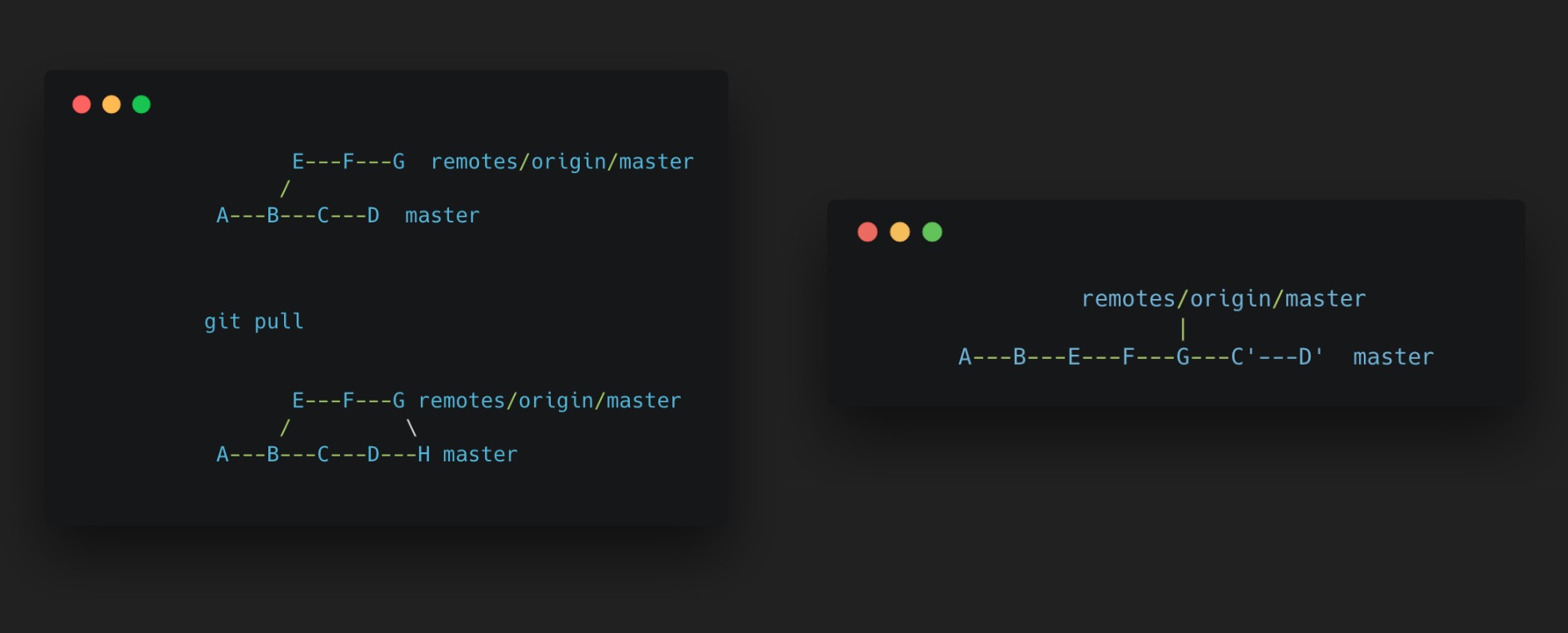
下面这张图展示了默认的 git pullgit pull --rebase 的结果差异,使用 git pull --rebase 目的是修整提交线图,使其形成一条直线。

git_pull_rebase_diff.jpg

默认的 git pull 行为是 merge,可以进行如下设置修改默认的 git pull 行为:

# 为某个分支单独设置,这里是设置 dev 分支
git config branch.dev.rebase true
# 全局设置,所有的分支 git pull 均使用 --rebase
git config --global pull.rebase true
git config --global branch.autoSetupRebase always

这里需要说明一下,在我看来使用 git pull --rebase 操作是比较好的,能够得到一条很清晰的提交直线图,方便查看提交记录和 code review,但是由于 rebase 会改变提交历史,也存在一些不好的影响。这里就不做过多的讨论了,有兴趣的话可以移步知乎上的讨论:在开发过程中使用 git rebase 还是 git merge,优缺点分别是什么?

分支合并使用 --no-ff

  # 例如当前在 develop 分支,需要合并 feature/xxx 分支
  git merge --no-ff feature/xxx

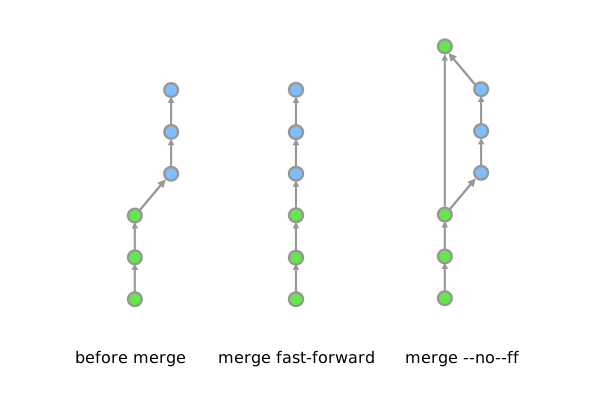
在解释这个命令之前,先解释下 Git 中的 fast-forward: 举例来说,开发一直在 develop 分支进行,此时有个新功能需要开发,新建一个 feature/a 分支,并在其上进行一系列开发和提交。当完成功能开发时,此时回到 develop 分支,此时 develop 分支在创建 feature/a 分支之后没有产生任何的 commit,那么此时的合并就叫做 fast-forward。

fast-forward 合并的结果如下图所示,这种 merge 的结果就是一条直线了,无法明确看到切出一个新的 feature 分支,并完成了一个新的功能开发,因此此时比较推荐使用 git merge --no-ff,得到的结果就很明确知道,新的一系列提交是完成了一个新的功能,如果需要对这个功能进行 code review,那么只需要检视叉的那条线上的提交即可。

git_merge_diff.svg

关于以上两个分支间的操作建议,如果需要了解更多,可以阅读洁癖者用 Git:pull --rebase 和 merge --no-ff 这篇文章。

项目分支操作流程示例

这部分内容结合日常项目的开发流程,涉及到开发新功能、分支合并、发布新版本以及发布紧急修复版本等操作,展示常用的命令和操作。

  1. 切到 develop 分支,更新 develop 最新代码

    git checkout develop
    git pull --rebase
    
  2. 新建 feature 分支,开发新功能

    git checkout -b feature/xxx
    ...
    git add <files>
    git commit -m "feat(xxx): commit a"
    git commit -m "feat(xxx): commit b"
    # 其他提交
    ...
    

    如果此时 develop 分支有一笔提交,影响到你的 feature 开发,可以 rebase develop 分支,前提是 该 feature 分支只有你自己一个在开发,如果多人都在该分支,需要进行协调:

    # 切换到 develop 分支并更新 develop 分支代码
    git checkout develop
    git pull --rebase
    
    # 切回 feature 分支
    git checkout feature/xxx
    git rebase develop
    
    # 如果需要提交到远端,且之前已经提交到远端,此时需要强推(强推需慎重!)
    git push --force
    

    上述场景也可以通过 git cherry-pick 来实现,有兴趣的可以去了解一下这个指令。

  3. 完成 feature 分支,合并到 develop 分支

    # 切到 develop 分支,更新下代码
    git check develop
    git pull --rebase
    
    # 合并 feature 分支
    git merge feature/xxx --no-ff
    
    # 删除 feature 分支
    git branch -d feature/xxx
    
    # 推到远端
    git push origin develop
    
  4. 当某个版本所有的 feature 分支均合并到 develop 分支,就可以切出 release 分支,准备发布新版本,提交测试并进行 bug fix

    # 当前在 develop 分支
    git checkout -b release/xxx
    
    # 在 release/xxx 分支进行 bug fix
    git commit -m "fix(xxx): xxxxx"
    ...
    
  5. 所有 bug 修复完成,准备发布新版本

    # master 分支合并 release 分支并添加 tag
    git checkout master
    git merge --no-ff release/xxx --no-ff
    # 添加版本标记,这里可以使用版本发布日期或者具体的版本号
    git tag 1.0.0
    
    # develop 分支合并 release 分支
    git checkout develop
    git merge --no-ff release/xxx
    
    # 删除 release 分支
    git branch -d release/xxx
    

    至此,一个新版本发布完成。

  6. 线上出现 bug,需要紧急发布修复版本

    # 当前在 master 分支
    git checkout master
    
    # 切出 hotfix 分支
    git checkout -b hotfix/xxx
    
    ... 进行 bug fix 提交
    
    # master 分支合并 hotfix 分支并添加 tag(紧急版本)
    git checkout master
    git merge --no-ff hotfix/xxx --no-ff
    # 添加版本标记,这里可以使用版本发布日期或者具体的版本号
    git tag 1.0.1
    
    # develop 分支合并 hotfix 分支(如果此时存在 release 分支的话,应当合并到 release 分支)
    git checkout develop
    git merge --no-ff hotfix/xxx
    
    # 删除 hotfix 分支
    git branch -d hotfix/xxx
    

    至此,紧急版本发布完成。

提交信息规范

提交信息规范部分参考 Angular.js commit messgae

git commit 格式 如下:

<type>(<scope>): <subject>

各个部分的说明如下:

  • type 类型,提交的类别

    • feat: 新功能
    • fix: 修复 bug
    • docs: 文档变动
    • style: 格式调整,对代码实际运行没有改动,例如添加空行、格式化等
    • refactor: bug 修复和添加新功能之外的代码改动
    • perf: 提升性能的改动
    • test: 添加或修正测试代码
    • chore: 构建过程或辅助工具和库(如文档生成)的更改
  • scope 修改范围

    主要是这次修改涉及到的部分,简单概括,例如 login、train-order

  • subject 修改的描述

    具体的修改描述信息

  • 范例

    feat(detail): 详情页修改样式
    fix(login): 登录页面错误处理
    test(list): 列表页添加测试代码
    

这里对提交规范加几点说明:

  1. type + scope 能够控制每笔提交改动的文件尽可能少且集中,避免一次很多文件改动或者多个改动合成一笔。
  2. subject 对于大部分国内项目而已,如果团队整体英文不是较高水平,比较推荐使用中文,方便阅读和检索。
  3. 避免重复的提交信息,如果发现上一笔提交没改完整,可以使用 git commit --amend 指令追加改动,尽量避免重复的提交信息。

参考资料

命名规则

避免使用一个字母命名

eslint

// bad
function q() {
  // ...
}

// good
function query() {
  // ...
}

使用小驼峰式命名对象、函数、实例

eslint

// bad
const OBJEcttsssss = {};
const this_is_my_object = {};
function c() {}

// good
const thisIsMyObject = {};
function thisIsMyFunction() {}

使用大驼峰式命名类

eslint

// bad
function user(options) {
  this.name = options.name;
}

const bad = new user({
  name: 'nope',
});

// good
class User {
  constructor(options) {
    this.name = options.name;
  }
}

const good = new User({
  name: 'yup',
});

不要使用前置或后置下划线(除非引入的第三方库本身使用)

eslint

JavaScript 没有私有属性或私有方法的概念。尽管前置下划线通常的概念上意味着“private”,事实上,这些属性是完全公有的,因此这部分也是你的API的内容。这一概念可能会导致开发者误以为更改这个不会导致崩溃或者不需要测试。 如果你想要什么东西变成“private”,那就不要让它在这里出现。
// bad
this.__firstName__ = 'Panda';
this.firstName_ = 'Panda';
this._firstName = 'Panda';

// good
this.firstName = 'Panda';

不要保存引用 this

用箭头函数或函数绑定——Function#bind

// bad
function foo() {
  const self = this;
  return function () {
    console.log(self);
  };
}

// bad
function foo() {
  const that = this;
  return function () {
    console.log(that);
  };
}

// good
function foo() {
  return () => {
    console.log(this);
  };
}

保证文件名、export 模块名以及 import 模块名一致

// file 1 contents
class CheckBox {
  // ...
}
export default CheckBox;

// file 2 contents
export default function fortyTwo() { return 42; }

// file 3 contents
export default function insideDirectory() {}

// in some other file
// bad
import CheckBox from './checkBox'; // PascalCase import/export, camelCase filename
import FortyTwo from './FortyTwo'; // PascalCase import/filename, camelCase export
import InsideDirectory from './InsideDirectory'; // PascalCase import/filename, camelCase export

// bad
import CheckBox from './check_box'; // PascalCase import/export, snake_case filename
import forty_two from './forty_two'; // snake_case import/filename, camelCase export
import inside_directory from './inside_directory'; // snake_case import, camelCase export
import index from './inside_directory/index'; // requiring the index file explicitly
import insideDirectory from './insideDirectory/index'; // requiring the index file explicitly

// good
import CheckBox from './CheckBox'; // PascalCase export/import/filename
import fortyTwo from './fortyTwo'; // camelCase export/import/filename
import insideDirectory from './insideDirectory'; // camelCase export/import/directory name/implicit "index"
// ^ supports both insideDirectory.js and insideDirectory/index.js

export default 一个函数时、函数名小驼峰式,文件与函数名一致

function makeStyleGuide() {
  // ...
}

export default makeStyleGuide;

export 一个结构体、类、单例、函数库或者对象时,使用大驼峰式

const Helpers = {
  guid: () => return uuid(),
};

export default Helpers;

简称或缩写应该全部大写或者全部小写

名字是给人读的,不是为了适应电脑的算法
// bad
import SmsContainer from './containers/SmsContainer';

// bad
const HttpRequests = [
  // ...
];

// good
import SMSContainer from './containers/SMSContainer';

// good
const HTTPRequests = [
  // ...
];

// best
import TextMessageContainer from './containers/TextMessageContainer';

// best
const Requests = [
  // ...
];

使用全大写字母设置静态变量

  1. 导出变量
  2. const 定义的, 保证不能被改变
  3. 这个变量是可信的,他的子属性都是不能被改变的

一般我们都将项目的全局参数使用这种 全大写+下划线分隔的常量 来定义一些系统配置参数导出,比如 const LIST_VIEW_PAGE_SIZE = 10 可以表示列表页每次加载10条数据;

如果导出项目是一个对象,那么必须保证这个对象的所有属性都是不可变的,同时,它的属性不再是全大写,而是使用小写驼峰式。

// bad
const PRIVATE_VARIABLE = 'should not be unnecessarily uppercased within a file';

// bad
export const THING_TO_BE_CHANGED = 'should obviously not be uppercased';

// bad
export let REASSIGNABLE_VARIABLE = 'do not use let with uppercase variables';

// ---

// allowed but does not supply semantic value
export const apiKey = 'SOMEKEY';

// better in most cases
export const API_KEY = 'SOMEKEY';

// ---

// bad - unnecessarily uppercases key while adding no semantic value
export const MAPPING = {
  KEY: 'value'
};

// good
export const MAPPING = {
  key: 'value'
};

访问器

若非必要,不要使用访问器

由于 JavaScript 的 getters/setters 是有副作用的,而且会让他人在查看代码的时候难以理解,后期也会难以维护,所以不推荐使用访问器函数,如果非要使用,可以使用自己实现的 getVal()setVal()

// bad
class Dragon {
  get age() {
    // ...
  }

  set age(value) {
    // ...
  }
}

// good
class Dragon {
  getAge() {
    // ...
  }

  setAge(value) {
    // ...
  }
}

如果属性或者方法是一个布尔判断值,那么使用 isVal() 或者 hasVal()

// bad
if (!dragon.age()) {
  return false;
}

// good
if (!dragon.hasAge()) {
  return false;
}

如果非要使用 get()set(),那么它们两者必须同时使用

class Jedi {
  constructor(options = {}) {
    const lightsaber = options.lightsaber || 'blue';
    this.set('lightsaber', lightsaber);
  }

  set(key, val) {
    this[key] = val;
  }

  get(key) {
    return this[key];
  }
}

事件

当你需要向事件附加数据时,将数据封装成为一个对象,而不是使用原始值,这会使得以后可以很方便的增加附加值的字段。

// bad
$(this).trigger('listingUpdated', listing.id);

// ...

$(this).on('listingUpdated', (e, listingID) => {
  // do something with listingID
});

而是:

// good
$(this).trigger('listingUpdated', { listingID: listing.id });

// ...

$(this).on('listingUpdated', (e, data) => {
  // do something with data.listingID
});

jQuery

为所有 jQuery 对象加上 $ 前缀

// bad
const sidebar = $('.sidebar');

// good
const $sidebar = $('.sidebar');

// good
const $sidebarBtn = $('.sidebar-btn');

缓存 jQuery 结果

// bad
function setSidebar() {
  $('.sidebar').hide();

  // ...

  $('.sidebar').css({
    'background-color': 'pink',
  });
}

// good
function setSidebar() {
  const $sidebar = $('.sidebar');
  $sidebar.hide();

  // ...

  $sidebar.css({
    'background-color': 'pink',
  });
}

使用级联查询 $('.sidebar ul') 或者子父级查询 $('.sidebar > ul')

在 jQuery 对象查询作用域下使用 find 方法

// bad
$('ul', '.sidebar').hide();

// bad
$('.sidebar').find('ul').hide();

// good
$('.sidebar ul').hide();

// good
$('.sidebar > ul').hide();

// good
$sidebar.find('ul').hide();

ES5 兼容性

直接参考 Kangax 提供的 ES5 兼容性列表

类型

基本类型

你可以直接获取到基本类型的值

  • string
  • number
  • boolean
  • null
  • undefined
  • symbol
const foo = 1;
let bar = foo;

bar = 9;

console.log(foo, bar); // => 1, 9
注意Symbols 不能被完整的 polyfill,所以,在不支持 Symbols 的环境下中,不应该使用 symbol 类型。

复杂类型

复杂类型赋值就是获取到他的引用的值,相当于引用传递

  • object
  • array
  • function
const foo = [1, 2];
const bar = foo;

bar[0] = 9;
console.log(foo[0], bar[0]); // => 9, 9

参考

永远都使用 const

为了确保你不会改变你的初始值,重复引用会导致一些不可预见的 bug,还会让代码难以理解,所有的赋值都应该使用 const,避免使用 var

eslint

// bad
var a = 1;
var b = 2;

// good
const a = 1;
const b = 2;

可以使用 let

如果你一定要对参数重新赋值,那就使用 let,而不是 varlet 是块级作用域,而 ver 是函数级作用域。

eslint

// bad
var count = 1;
if (true) {
  count += 1;
}

// good
let count = 1;
if (true) {
  count += 1;
}

注意 constlet 的块级作用域

constlet 声明的常量与变量都只存在于定义它们的那个块级作用域中。

{
  let a = 1;
  const b = 1;
}

console.log(a); // ReferenceError
console.log(b); // ReferenceError

对象

永远使用字面量创建对象

eslint

// bad
const obj = new Object();

// good
const obj = {};

使用计算属性名

当你需要创建一个带有 动态属性名 的对象时,请将所有的属性定义放在一起,可以使用 计算属性名

function getKey(key) {
  return `a key named ${key}`;
}

// bad
const obj = {
  id: 1,
  name: 'Parc MG',
};
obj[getKey('enabled')] = true;

// good
const obj = {
  id: 1,
  name: 'Parc MG',
  [getKey('enabled')]: true
};

对象方法简写

eslint

// bad
const atom = {
  value: 1,
  add: function (value) {
    return atom.value + value;
  }
};

// good
const atom = {
  value: 1,
  add(value) {
    return atom.value + value;
  }
};

属性值缩写

eslint

const name = 'Parc MG';

// bad
const org = {
  name: name,
};

// good
const org = {
  name,
};

将所有属性值缩写放在对象声明的最前面

const name = 'Parc MG';
const url = 'https://parcmg.com';

// bad
const org = {
  email: 'contact@parcmg.com',
  name,
  created: new Date(),
  url,
};

// good
const org = {
  name,
  url,
  email: 'contact@parcmg.com',
  created: new Date(),
};

若非必要,属性名不使用 ''

eslint

// bad
const bad = {
  'foo': 1,
  'bar': 2,
  'foo-bar': 3,
};

// good
const good = {
  foo: 1,
  bar: 2,
  'foo-bar': 3,
};

不直接调用对象原型上的方法

不直接调用一个对象的 hasOwnPropertypropertyIsEnumerableisPrototypeOf 等这些原型的方法,在某些情况下,这些方法可能会被屏蔽掉,比如 { hasOwnProperty: false } 或者是一个空对象 Object.create(null)

// bad
obj.hasOwnProperty(key);

// good
Object.prototype.hasOwnProperty.call(obj, key);

// best
const has = Object.prototype.hasOwnProperty;

has.call(obj, key);

积极使用扩展及解构运算 ...

  • 在对象的 浅拷贝 时,更推荐使用扩展运算 { ...obj },而不是 Object.assign
  • 在获取对象指定的几个属性时,使用解构运算 { foo, bar, ...rest } = obj

eslint

// very bad
const original = { a: 1, b: 2 };
const copied = Object.assign(original, { c: 3 }); // 这将导致 original 也被修改

delete copied.a; // 这样操作之后会导致 original 也被修改
console.log(original); // => {b: 2, c: 3}

// bad
const original = { a: 1, b: 2 };
const copied = Object.assign({}, original, { c: 3}};

// good
const original = { a: 1, b: 2 };
const copied = { ...original, c: 3 };

// 解构运算与 `rest` 赋值运算
const obj = { a: 1, b: 2, c: 3 };
const { a, b } = obj; // 从对象 obj 中解构出 a, b 两个属性的值,并赋值给名为 a,b 的常量
const { a, ...rest } = obj; // 从对象 obj 中解构出 a 的值,并赋值给名为 a 的常量,同时,创建一个由所有其它属性组成的名为 `rest` 的新对象
console.log(rest); // => { b: 2, c: 3 }

// bad
function getFullName(user) {
  const firstName = user.firstName;
  const lastName = user.lastName;
  
  return `${firstName} ${lastName}`;
}

// good
function getFullName(user) {
  const { firstName, lastName } = user;
  return `${firstName} ${lastName}`;
}

// best
function getFullName({ firstName, lastName}) {
  return `${firstName} ${lastName}`;
}

// the most best
const getFullName = ({ firstName, lastName }) => `${firstName} ${lastName}`;

返回多值时,使用对象解构,而非数组结构

由于 JavaScript 不支持多值返回,当一个函数或者方法有多个值需要创建时,请为每一个值命名,并以所有值组成的对象为单一值返回,而不是以数组的形式返回。

// bad
function processInput(input) {
  return [left, right, top, bottom];
}

const [left, _, top] = processInput(input); // 调用者需要在调用时,明确的知道每一个索引上的值是什么 ,且无法跳越前面的值取后面的值

// good
function processInput(input) {
  return { left, right, top, bottom };
}

const { left, top } = processInput(input); // 调用者可以明确的指定需要哪个值,而且不需要创建多余的变量

数组

使用字面量赋值

eslint

// bad
const items = new Array();

// good
const items = [];

使用 .push 方法代替直接索引赋值

const items = [];

// bad
items[items.length] = 'new item';

// good
items.push('new item');

使用扩展运算符进行浅拷贝

const items = [1, 2, 3, 4, 5];

// bad
const length = items.length;
const copied = [];
let index;

for (index = 0; index < length; index += 1) {
  copied[index] = items[index];
}

// good
const copied = [ ...items ];

使用 ... 运算符代替 Array.from

当需要将一个可迭代的对象转换成数组时,推荐使用 ... 操作符。

const elements = document.querySelectorAll('.foobar');

// not bad
const nodes = Array.from(elements);

// good
const nodes = [ ...elements ];

使用 ... 解构数组

const array = [1, 2, 3, 4, 5];

// bad
const first = array[0];
const second = array[1];

// good
const [first, second, ...rest] = array;
console.log(rest); // => [3, 4, 5]

使用 Array.from 将类数组对象转成数组

参考:Typed Arrays
const arrayLike = { 0: 'foo', 1: 'bar', 2: 'baz', length: 3 }

// bad
const array = Array.prototype.slice.call(arrayLike);

// good
const array = Array.from(arrayLike);

使用 Array.from 对类数组对象进行遍历

Array.from(arrayLike[, mapFn[, thisArg]]) 方法,参考 Array.from
const arrayLike = { 0: 'foo', 1: 'bar', 2: 'baz', length: 3 }

// bad
const array = [...arrayLike].map(mapFn);

// good
const array = Array.from(arrayLike, mapFn);

在数组方法的回调函数中,永远返回正确的值

// bad - 当第一次迭代完成之后, acc 就变成了 undefined 了
[[0, 1], [2, 3], [4, 5]].reduce((acc, item, index) => {
  const flatten = acc.concat(item);
  acc[index] = flatten;
});

// good
[[0, 1], [2, 3], [4, 5]].reduce((acc, item, index) => {
  const flatten = acc.concat(item);
  acc[index] = flatten;
  return flatten;
});

// bad
messages.filter(msg => {
  const { subject, author } = msg;
  if (subject === 'ParcMG') {
    return author === 'MG';
  } else {
    return false;
  }
});

// good
messages.filter(msg => {
  const { subject, author } = msg;
  if (subject === 'ParcMG') {
    return author === 'MG';
  }
  return false;
});

// bad
[1, 2, 3].map(x => {
  const y = x + 1;
  return x * y;
}

// good
[1, 2, 3].map(x => x * (x + 1));

一个数组有多行时,在 [] 处断行

// bad
const array = [
  [0, 1], [2, 3], [4, 5], [6, 7]
];

const objectArray = [{
  id: 1,
}, {
  id: 2,
}];

const numberArray = [
  1, 2,
];

// good
const array = [[0, 1], [2, 3], [4, 5], [6, 7]];

const objectArray = [
  {
    id: 1,
  },
  {
    id: 2,
  }
];

const numberArray = [1, 2];

const numberArray = [
  1,
  2,
];

字符串

string 永远使用单引号 ''

eslint

// bad
const name = "Parc M.G";

const name = `Parc M.G`;

// good
const name = 'Parc M.G';

超长的字符串,不应该使用多行串联

// bad
const content = '《学而》是《论语》第一篇的篇名。《论语》中各篇一般都是以第\
一章的前二三个字作为该篇的篇名。《学而》一篇包括16章,内容涉及诸多方面。其中重\
点是「吾日三省吾身」;「节用而爱人,使民以时」;「礼之用,和为贵」以及仁、孝、\
信等道德范畴。';

const content = '《学而》是《论语》第一篇的篇名。《论语》中各篇一般都是以第' +
'一章的前二三个字作为该篇的篇名。《学而》一篇包括16章,内容涉及诸多方面。其中重' +
'点是「吾日三省吾身」;「节用而爱人,使民以时」;「礼之用,和为贵」以及仁、孝、' +
'信等道德范畴。';

// good
const content = '《学而》是《论语》第一篇的篇名。《论语》中各篇一般都是以第\一章的前二三个字作为该篇的篇名。《学而》一篇包括16章,内容涉及诸多方面。其中重点是「吾日三省吾身」;「节用而爱人,使民以时」;「礼之用,和为贵」以及仁、孝、信等道德范畴。';

使用模板而非拼接来组织可编程字符串

eslint

// bad
function hello(name) {
  return '你好,' + name + '!';
}

function hello(name) {
  return ['你好,', name, '!'].join('');
}

function hello(name) {
  return `你好,${ name }!`;
}

// good
function hello(name) {
  return `你好,${name}!`;
}

永远不使用 eval()

eslint

若非必要,不使用转义字符

eslint

// bad
const foo = '\'this\' \i\s \"quoted\"';

// good
const foo = '\this\' is "quoted"';

// best
const foo = `'this' is "quoted"`;

函数

使用命名函数表达式,而不是函数声明

eslint

使用函数声明,它的作用域会被提前,这意味着很容易在一个文件里面引用一个还未被定义的函数,这样大大伤害了代码的可读性和可维护性,若一个函数很大很复杂,那么应该考虑将该函数单独提取到一个文件中,抽离成一个模块,同时不要忘记给表达式显示的命名,这消除了由匿名函数在错误调用栈中产生的所有假设。
// bad
function foo() {
  // ...
}

// bad
const foo = function () {
  // ...
}

// good
const foo = function foo() {
  // ...
}

// best
const foo = function longUniqueMoreDescriptiveLexicalFoo() {
  // ...
}

把立即执行函数包裹在圆括号里

eslint

(function () {
  console.log('Welcome to the ParcMG world.');
}());

不要在非函数块内声明函数

虽然运行环境允许你这样做,但是不同环境的解析方式不一样。

eslint

//bad 
for (var i=10; i; i--) {
    (function() { return i; })();
}

while(i) {
    var a = function() { return i; };
    a();
}

do {
    function a() { return i; };
    a();
} while (i);

let foo = 0;
for (let i = 0; i < 10; ++i) {
    // Bad, `foo` is not in the loop-block's scope and `foo` is modified in/after the loop
    setTimeout(() => console.log(foo));
    foo += 1;
}

for (let i = 0; i < 10; ++i) {
    // Bad, `foo` is not in the loop-block's scope and `foo` is modified in/after the loop
    setTimeout(() => console.log(foo));
}
foo = 100;

// good
var a = function() {};

for (var i=10; i; i--) {
    a();
}

for (var i=10; i; i--) {
    var a = function() {}; // OK, no references to variables in the outer scopes.
    a();
}

for (let i=10; i; i--) {
    var a = function() { return i; }; // OK, all references are referring to block scoped variables in the loop.
    a();
}

var foo = 100;
for (let i=10; i; i--) {
    var a = function() { return foo; }; // OK, all references are referring to never modified variables.
    a();
}

注意:在 ECMA-262 中,块(block 的定义是:一系列语句,但函数声明不是一个语句,命名函数表达式是一个语句。

// bad
if (currentUser) {
  function test() {
    console.log('Nope.');
  }
}

// good
let test;
if (currentUser) {
  test = () => {
    console.log('Yup.');
  };
}

不允许使用 arguments 命名参数

arguments 的优先级高于高于每个函数作用域自带的 arguments 对象,这会导致函数自带的 arguments 值被覆盖。

// bad
function foo(name, options, arguments) {
  // ...
}

// good
function foo(name, options, args) {
  // ...
}

不要在函数体内使用 arguments,使用 ...rest 代替

eslint

... 明确出你想用那个参数,同时,rest 是一个真数组,而不是一个类数组的 arguments
// bad
function concatenateAll() {
  const args = Array.prototype.slice.call(arguments);
  return args.join('');
}

// good
function concatenateAll(...args) {
  return args.join('');
}

使用默认参数,而不是在函数体内对参数重新赋值

// really bad
function handleThings(options) {
  options = options || {};
}

// still bad
function handleTings(options) {
  if (options === void 0) {
    options = {};
  }
}

// good
function handleThings(options = {}) {
}

默认参数要避免副作用

// bad
let v = 1;
const count = function count(a = v++) {
  console.log(a);
}

count();   // => 1
count();   // => 2
count(3);  // => 3
count();   // => 3

// maybe
const v = 1;
const count = function count(a = v) {
  console.log(a);
}

把默认参数放在最后

// bad
function handleTings(options = {}, name) {
  // ...
}

// good
function handleTings(name, options = {}) {
  // ...
}

不要使用函数构造器构造函数

eslint

// bad
var add = new Function('a', 'b', 'return a + b');

// still bad
var subtract = Function('a', 'b', 'return a - b');

// good
const subtract = (a, b) => a + b;

函数签名部分要有空格

eslint

// bad
const f = function(){};
const g = function (){};
const h = function() {};

// good
const f = function a() {};

不修改参数

eslint

函数签名时定义的参数,在函数体内不允许被重新赋值(包含参数本身,若参数为对象,还包括该对象所有属性的值),
一个函数应该是没有任何副作用的。
// bad
function f1 (obj) {
  obj.key = 1;
};

function f2 (a) {
  a = 1;
  // ...
}

function f3 (a) {
  if (!a) { a = 1; }
  // ...
}

// good
function f4(obj) {
  const key = Object.prototype.hasOwnProperty.call(obj, 'key') ? obj.key : 1;
};

function f5(a) {
  const b = a || 1;
  // ...
}

function f6(a = 1) {
  // ...
}

使用 spread 操作符 ... 调用多变参数函数

eslint

// bad
const x = [1, 2, 3, 4, 5];
console.log.apply(console, x);

// good
const x = [1, 2, 3, 4, 5];
console.log(...x);

// bad
new (Function.prototype.bind.apply(Date, [null, 2016, 8, 5]));

// good
new Date(...[2016, 8, 5]);

若函数签名包含多个参数需要使用多行,那就每行有且仅有一个参数

// bad
function foo(bar,
             baz,
             quux) {
  // ...
}

// good 缩进不要太过分
function foo(
  bar,
  baz,
  quux,
) {
  // ...
}

// bad
console.log(foo,
  bar,
  baz);

// good
console.log(
  foo,
  bar,
  baz,
);

箭头函数

当你一定要用函数表达式的时候,就使用箭头函数

eslint

// bad
[1, 2, 3].map(function (x) {
  const y = x + 1;
  return x * y;
});

// good
[1, 2, 3].map((x) => {
  const y = x + 1;
  return x * y;
});

如果函数体有且仅有一个没有副作用的表达式,那么删除大括号和 return

eslint

// bad
[1, 2, 3].map(number => {
  const nextNumber = number + 1;
  `A string containing the ${nextNumber}.`;
});

// good
[1, 2, 3].map(number => `A string containing the ${number}.`);

// good
[1, 2, 3].map((number) => {
  const nextNumber = number + 1;
  return `A string containing the ${nextNumber}.`;
});

// good
[1, 2, 3].map((number, index) => ({
  [index]: number
}));

// 表达式有副作用就不要用隐式return
function foo(callback) {
  const val = callback();
  if (val === true) {
    // Do something if callback returns true
  }
}

let bool = false;

// bad
// 这种情况会return bool = true, 不好
foo(() => bool = true);

// good
foo(() => {
  bool = true;
});

若表达式包含多行,用圆括号包裹起来

// bad
['get', 'post', 'put'].map(httpMethod => Object.prototype.hasOwnProperty.call(
    httpMagicObjectWithAVeryLongName,
    httpMethod
  )
);

// good
['get', 'post', 'put'].map(httpMethod => (
  Object.prototype.hasOwnProperty.call(
    httpMagicObjectWithAVeryLongName,
    httpMethod
  )
));

若函数只有一个参数,且没有大括号,那就删除圆括号,否则,参数总是放在圆括号里。

eslint

// bad
[1, 2, 3].map((x) => x * x);

// good
[1, 2, 3].map(x => x * x);

// good
[1, 2, 3].map(number => (
  `A long string with the ${number}. It’s so long that we don’t want it to take up space on the .map line!`
));

// bad
[1, 2, 3].map(x => {
  const y = x + 1;
  return x * y;
});

// good
[1, 2, 3].map((x) => {
  const y = x + 1;
  return x * y;
});

避免箭头函数(=>)和比较操作符(<=, >=)混淆.

eslint

// bad
const itemHeight = item => item.height > 256 ? item.largeSize : item.smallSize;

// bad
const itemHeight = (item) => item.height > 256 ? item.largeSize : item.smallSize;

// good
const itemHeight = item => (item.height > 256 ? item.largeSize : item.smallSize);

// good
const itemHeight = (item) => {
  const { height, largeSize, smallSize } = item;
  return height > 256 ? largeSize : smallSize;
};

在隐式return中强制约束函数体的位置, 就写在箭头后面

eslint

// bad
(foo) =>
  bar;

(foo) =>
  (bar);

// good
(foo) => bar;
(foo) => (bar);
(foo) => (
   bar
)

类与构造器

使用构造器,而不是 prototype

// bad
function Queue(contents = []) {
  this.queue = [...contents];
}
Queue.prototype.pop = function () {
  const value = this.queue[0];
  this.queue.splice(0, 1);
  return value;
};


// good
class Queue {
  constructor(contents = []) {
    this.queue = [...contents];
  }
  pop() {
    const value = this.queue[0];
    this.queue.splice(0, 1);
    return value;
  }
}

使用 extends 实现继承

它是一种内置的方法来继承原型功能而不打破 instanceof

// bad
const inherits = require('inherits');
function PeekableQueue(contents) {
  Queue.apply(this, contents);
}
inherits(PeekableQueue, Queue);
PeekableQueue.prototype.peek = function () {
  return this._queue[0];
}

// good
class PeekableQueue extends Queue {
  peek() {
    return this._queue[0];
  }
}

方法可以返回 this 实现方法链

// bad
Jedi.prototype.jump = function () {
  this.jumping = true;
  return true;
};

Jedi.prototype.setHeight = function (height) {
  this.height = height;
};

const luke = new Jedi();
luke.jump(); // => true
luke.setHeight(20); // => undefined

// good
class Jedi {
  jump() {
    this.jumping = true;
    return this;
  }

  setHeight(height) {
    this.height = height;
    return this;
  }
}

const luke = new Jedi();

luke.jump()
  .setHeight(20);

只要保证可以正常工作且没有副作用,可以自已定制 toString 方法

class Jedi {
  constructor(options = {}) {
    this.name = options.name || 'no name';
  }

  getName() {
    return this.name;
  }

  toString() {
    return `Jedi - ${this.getName()}`;
  }
}

不要写无用的构造函数

eslint

// bad
class Jedi {
  constructor() {}

  getName() {
    return this.name;
  }
}

// bad
class Rey extends Jedi {
  // 这种构造函数是不需要写的
  constructor(...args) {
    super(...args);
  }
}

// good
class Rey extends Jedi {
  constructor(...args) {
    super(...args);
    this.name = 'Rey';
  }
}

避免重复类成员

eslint

// bad
class Foo {
  bar() { return 1; }
  bar() { return 2; }
}

// good
class Foo {
  bar() { return 1; }
}

// good
class Foo {
  bar() { return 2; }
}

模块

使用 import / export

// bad
const Button = require('./Button');
module.exports = Button.es6;

// ok
import Button from './Button';
export default Button.es6;

// best
import { es6 } from './Button';
export default es6;

不要 import 通配符

// bad
import * as Component from './Component';

// good
import Component from './Component';

不要直接从 importexport

虽然一行是简洁的,有一个明确的方式进口和一个明确的出口方式来保证一致性。
// bad
export { es6 as default } from './Component';

// good
import { es6 } from './Component';
export default es6;

一个路径只 import 一次

eslint

从同一个路径下import多行会使代码难以维护
// bad
import foo from 'foo';
// … some other imports … //
import { named1, named2 } from 'foo';

// good
import foo, { named1, named2 } from 'foo';

// good
import foo, {
  named1,
  named2,
} from 'foo';

若非必要,不要 export 可变量

eslint

变化通常都是需要避免,特别是当你要输出可变的绑定。虽然在某些场景下可能需要这种技术,但总的来说应该导出常量。
// bad
let foo = 3;
export { foo }

// good
const foo = 3;
export { foo }

在一个单一导出模块里,使用 export default

eslint

鼓励使用更多文件,每个文件只做一件事情并导出,这样可读性和可维护性更好。
// bad
export function foo() {}

// good
export default function foo() {}

import 应该放在所有其它语句之前

eslint

// bad
import foo from 'foo';
foo.init();

import bar from 'bar';

// good
import foo from 'foo';
import bar from 'bar';

foo.init();

多行import应该缩进,就像多行数组和对象字面量

花括号与样式指南中每个其他花括号块遵循相同的缩进规则,逗号也是。
// bad
import {longNameA, longNameB, longNameC, longNameD, longNameE} from 'path';

// good
import {
  longNameA,
  longNameB,
  longNameC,
  longNameD,
  longNameE,
} from 'path';

若使用 webpack,不允许在 import 中使用 webpack loader 语法

eslint

一旦用 Webpack 语法在 import 里会把代码耦合到模块绑定器。最好是在 webpack.config.js 里写 webpack loader 语法
// bad
import fooSass from 'css!sass!foo.scss';
import barCss from 'style!css!bar.css';

// good
import fooSass from 'foo.scss';
import barCss from 'bar.css';

迭代器与生成器

不要使用遍历器

eslint

用JavaScript高级函数代替 for-infor-of

  • 这强调了我们不可变的规则。 处理返回值的纯函数比副作用更容易。
  • 用数组的这些迭代方法: map()every()filter()find()findIndex()reduce()some()……
  • 用对象的这些方法 Object.keys()Object.values()Object.entries 去产生一个数组, 这样你就能去遍历对象了。
const numbers = [1, 2, 3, 4, 5];

// bad
let sum = 0;
for (let num of numbers) {
  sum += num;
}
sum === 15;

// good
let sum = 0;
numbers.forEach(num => sum += num);
sum === 15;

// best (use the functional force)
const sum = numbers.reduce((total, num) => total + num, 0);
sum === 15;

// bad
const increasedByOne = [];
for (let i = 0; i < numbers.length; i++) {
  increasedByOne.push(numbers[i] + 1);
}

// good
const increasedByOne = [];
numbers.forEach(num => increasedByOne.push(num + 1));

// best (keeping it functional)
const increasedByOne = numbers.map(num => num + 1);

不要用 generator

eslint

它在es5上支持的不好

如果一定要用,那么一定需要注意一点:function* 是同一概念关键字, * 并不是 function 的修饰符, function* 是一个与 function 完全不一样的独特结构。

// bad
function * foo() {
  // ...
}

// bad
const bar = function * () {
  // ...
}

// bad
const baz = function *() {
  // ...
}

// bad
const quux = function*() {
  // ...
}

// bad
function*foo() {
  // ...
}

// bad
function *foo() {
  // ...
}

// very bad
function
*
foo() {
  // ...
}

// very bad
const wat = function
*
() {
  // ...
}

// good
function* foo() {
  // ...
}

// good
const foo = function* () {
  // ...
}

属性

访问属性使用 .

eslint

这条,涉及一个曾经阿里出过一个看似简单,实则很难的面试题,你就算猜对一个,你也不一定能说出原理:

a.b.c.d和a'b'['d'],哪个性能更高

到这里,突然想起这个梗,有兴趣的可以翻看一下 这里

const luke = {
  jedi: true,
  age: 28,
};

// bad
const isJedi = luke['jedi'];

// good
const isJedi = luke.jedi;

当获取属性名称本身是一个变量是,使用 [] 访问

const luke = {
  jedi: true,
  age: 28,
};

function getProp(prop) {
  return luke[prop];
}

const isJedi = getProp('jedi');

幂等使用 ** 操作符

eslint

// bad
const binary = Math.pow(2, 10);

// good
const binary = 2 ** 10;

变量

永远使用 const 或者 let,不使用 var

eslint

// bad
superPower = new SuperPower();

// good
const superPower = new SuperPower();

每一个变量都用一个 const 或者 let

eslint

扯蛋的理由:这种方式很容易去声明新的变量,你不用去考虑把;调换成,,或者引入一个只有标点的不同的变化。

真正的理由:做法也可以是你在调试的时候单步每个声明语句,而不是一下跳过所有声明。

// bad
const items = getItems(),
    goSportsTeam = true,
    dragonball = 'z';

const items = getItems(),
    goSportsTeam = true;
    dragonball = 'z';

// good
const items = getItems();
const goSportsTeam = true;
const dragonball = 'z';

尘归尘,土归土

在同一个块中,所有的 const 放在一起,所有的 let 放在一起

// bad
let i, len, dragonball,
    items = getItems(),
    goSportsTeam = true;

// bad
let i;
const items = getItems();
let dragonball;
const goSportsTeam = true;
let len;

// good
const goSportsTeam = true;
const items = getItems();
let dragonball;
let i;
let length;

在你需要的地方声明变量,但要放在合理的位置

// bad
function checkName(hasName) {
  const name = getName();

  if (hasName === 'test') {
    return false;
  }

  if (name === 'test') {
    this.setName('');
    return false;
  }

  return name;
}

// good
function checkName(hasName) {
  if (hasName === 'test') {
    return false;
  }

  // 在需要的时候分配
  const name = getName();

  if (name === 'test') {
    this.setName('');
    return false;
  }

  return name;
}

不使用链接变量分配

eslint

链接变量分配会隐匿创建全局变量

// bad
(function example() {
  // JavaScript 将这一段解释为
  // let a = ( b = ( c = 1 ) );
  // let 只对变量 a 起作用; 变量 b 和 c 都变成了全局变量
  let a = b = c = 1;
}());

console.log(a); // undefined
console.log(b); // 1
console.log(c); // 1

// good
(function example() {
  let a = 1;
  let b = a;
  let c = a;
}());

console.log(a); // undefined
console.log(b); // undefined
console.log(c); // undefined

// `const` 也是如此

不使用一元自增自减运算(++--

eslint

根据 eslint 文档,一元增量和减量语句受到自动分号插入的影响,并且可能会导致应用程序中的值递增或递减的无声错误。 使用 num + = 1 而不是 num ++num ++ 语句来表达你的值也是更有表现力的。 禁止一元增量和减量语句还会阻止您无意地预增/预减值,这也会导致程序出现意外行为。

// bad

let array = [1, 2, 3];
let num = 1;
num++;
--num;

let sum = 0;
let truthyCount = 0;
for(let i = 0; i < array.length; i++){
  let value = array[i];
  sum += value;
  if (value) {
    truthyCount++;
  }
}

// good

let array = [1, 2, 3];
let num = 1;
num += 1;
num -= 1;

const sum = array.reduce((a, b) => a + b, 0);
const truthyCount = array.filter(Boolean).length;

赋值时不换行

eslint

如果赋值语句超出了 max-len 配置,那么给值前面加上括号。

// bad
const foo =
  superLongLongLongLongLongLongLongLongFunctionName();

// bad
const foo
  = 'superLongLongLongLongLongLongLongLongString';

// good
const foo = (
  superLongLongLongLongLongLongLongLongFunctionName()
);

// good
const foo = 'superLongLongLongLongLongLongLongLongString';

不允许声明不使用的变量

eslint

// bad

var some_unused_var = 42;

// 写了没用
var y = 10;
y = 5;

// 变量改了自己的值,也没有用这个变量
var z = 0;
z = z + 1;

// 参数定义了但未使用
function getX(x, y) {
    return x;
}

// good
function getXPlusY(x, y) {
  return x + y;
}

var x = 1;
var y = a + 2;

alert(getXPlusY(x, y));

// 'type' 即使没有使用也可以可以被忽略, 因为这个有一个 rest 取值的属性。
// 这是从对象中抽取一个忽略特殊字段的对象的一种形式
var { type, ...coords } = data;
// 'coords' 现在就是一个没有 'type' 属性的 'data' 对象

变量提升

永远不要使用 var

var 声明会将变量声明提升到作用域的最前面,但是他的值却只有在运行到代码行时才会被赋值,永远都使用 constlet,了解 时效区(Temporal Dead Zones) 的相关知识,也还要知道为什么 typeof 不再安全

// 我们知道这个不会工作,假设没有定义全局的notDefined
function example() {
  console.log(notDefined); // => throws a ReferenceError
}

// 在你引用的地方之后声明一个变量,他会正常输出是因为变量作用域上升。
// 注意: declaredButNotAssigned的值没有上升
function example() {
  console.log(declaredButNotAssigned); // => undefined
  var declaredButNotAssigned = true;
}

// 解释器把变量声明提升到作用域最前面,
// 可以重写成如下例子, 二者意义相同
function example() {
  let declaredButNotAssigned;
  console.log(declaredButNotAssigned); // => undefined
  declaredButNotAssigned = true;
}

// 用 const, let就不一样了
function example() {
  console.log(declaredButNotAssigned); // => throws a ReferenceError
  console.log(typeof declaredButNotAssigned); // => throws a ReferenceError
  const declaredButNotAssigned = true;
}

匿名函数表达式与 var 的情况一样

function example() {
  console.log(anonymous); // => undefined

  anonymous(); // => TypeError anonymous is not a function

  var anonymous = function () {
    console.log('anonymous function expression');
  };
}

已命名函数表达式只提升变量名,而不是函数名或者函数体

function example() {
  console.log(named); // => undefined

  named(); // => TypeError named is not a function

  superPower(); // => ReferenceError superPower is not defined

  var named = function superPower() {
    console.log('Flying');
  };
}

// 函数名和变量名一样是也如此
function example() {
  console.log(named); // => undefined

  named(); // => TypeError named is not a function

  var named = function named() {
    console.log('named');
  };
}

函数声明则提升了函数名和函数体

function example() {
  superPower(); // => Flying

  function superPower() {
    console.log('Flying');
  }
}

比较操作符

永远使用 ===!==,而不是 ==!=

eslint

if 条件语句的强制 toBoolean

if 条件语句的强制 toBoolean 总是遵循以下规则:

  • Objects 总是计算成 true
  • Undefined 总是计算 成 false
  • Null 总是计算成 false
  • Booleans 计算成它本身的布尔值
  • Numbers

    • +0-0 或者 NaN 总是计算成 false
    • 其它的全部为 true
  • Strings

    • '' 计算成 false
    • 其它全部为 true
注意NaN 是不等于 NaN 的,请使用 isNaN() 检测。
if ([0] && []) {
  // true
  // 数组(即使是空数组)是对象,对象会计算成true
}

console.log(NaN === NaN) // => false
console.log(isNaN(NaN))  // => true

布尔值要使用缩写,但是字符串与数字要明确比较对象

// bad
if (isValid === true) {
  // ...
}

// good
if (isValid) {
  // ...
}

// bad
if (name) {
  // ...
}

// good
if (name !== '') {
  // ...
}

// bad
if (collection.length) {
  // ...
}

// good
if (collection.length > 0) {
  // ...
}

switchcasedefault 分句中使用大括号创建语法声明区域

eslint

语法声明在整个 switch 的代码块里都可见,但是只有当其被分配后才会初始化,他的初始化时当这个 case 被执行时才产生。 当多个 case 分句试图定义同一个事情时就出问题了

// bad
switch (foo) {
  case 1:
    let x = 1;
    break;
  case 2:
    const y = 2;
    break;
  case 3:
    function f() {
      // ...
    }
    break;
  default:
    class C {}
}

// good
switch (foo) {
  case 1: {
    let x = 1;
    break;
  }
  case 2: {
    const y = 2;
    break;
  }
  case 3: {
    function f() {
      // ...
    }
    break;
  }
  case 4:
    bar();
    break;
  default: {
    class C {}
  }
}

三元运算符不能被嵌套

eslint

// bad
const foo = maybe1 > maybe2
  ? "bar"
  : value1 > value2 ? "baz" : null;

// better
const maybeNull = value1 > value2 ? 'baz' : null;

const foo = maybe1 > maybe2
  ? 'bar'
  : maybeNull;

// best
const maybeNull = value1 > value2 ? 'baz' : null;

const foo = maybe1 > maybe2 ? 'bar' : maybeNull;

避免不必要的三元表达式

// bad
const foo = a ? a : b;
const bar = c ? true : false;
const baz = c ? false : true;

// good
const foo = a || b;
const bar = !!c;
const baz = !c;

除非优先级显而易见,否则使用圆括号来混合操作符

eslint

开发者需要以最显而易见的方式明确自己的意图与逻辑

// bad
const foo = a && b < 0 || c > 0 || d + 1 === 0;

// bad
const bar = a ** b - 5 % d;

// bad
// 别人会陷入(a || b) && c 的迷惑中
if (a || b && c) {
  return d;
}

// good
const foo = (a && b < 0) || c > 0 || (d + 1 === 0);

// good
const bar = (a ** b) - (5 % d);

// good
if (a || (b && c)) {
  return d;
}

// good
const bar = a + b / c * d;

区块

用大括号包裹多行代码

eslint

// bad
if (test)
  return false;

// good
if (test) return false;

// good
if (test) {
  return false;
}

// bad
function foo() { return false; }

// good
function bar() {
  return false;
}

if 以及 elseif 的关闭大括号在同一行

eslint

// bad
if (test) {
  thing1();
  thing2();
}
else {
  thing3();
}

// good
if (test) {
  thing1();
  thing2();
} else {
  thing3();
}

if 语句中的 return

eslint

  • no-else-return
  • 如果 if 语句中总是需要用 return 返回,那么后续的 else 就不需要写了
  • 如果 if 块中包含 return,它后面的 else if 也包含了 return,那就应该把 else ifreturn 分到多个 if 语句块中去。
// bad
function foo() {
  if (x) {
    return x;
  } else {
    return y;
  }
}

// bad
function cats() {
  if (x) {
    return x;
  } else if (y) {
    return y;
  }
}

// bad
function dogs() {
  if (x) {
    return x;
  } else {
    if (y) {
      return y;
    }
  }
}

// good
function foo() {
  if (x) {
    return x;
  }

  return y;
}

// good
function cats() {
  if (x) {
    return x;
  }

  if (y) {
    return y;
  }
}

// good
function dogs(x) {
  if (x) {
    if (z) {
      return y;
    }
  } else {
    return z;
  }
}

控制语句

当你的控制语句 (ifwhile)等太长,或者超过最大长度限制时,把每一个判断条件都放到单独一行去,逻辑操作符放在行首

// bad
if ((foo === 123 || bar === 'abc') && doesItLookGoodWhenItBecomesThatLong() && isThisReallyHappening()) {
  thing1();
}

// bad
if (foo === 123 &&
  bar === 'abc') {
  thing1();
}

// bad
if (foo === 123
  && bar === 'abc') {
  thing1();
}

// bad
if (
  foo === 123 &&
  bar === 'abc'
) {
  thing1();
}

// good
if (
  foo === 123
  && bar === 'abc'
) {
  thing1();
}

// good
if (
  (foo === 123 || bar === 'abc')
  && doesItLookGoodWhenItBecomesThatLong()
  && isThisReallyHappening()
) {
  thing1();
}

// good
if (foo === 123 && bar === 'abc') {
  thing1();
}

不要用选择操作符代替控制语句

// bad
!isRunning && startRunning();

// good
if (!isRunning) {
  startRunning();
}

注释

多行注释使用 /** ... */

// bad
// make() 基于传入的 `tag` 名返回一个新元素
//
// @param {String} 标签名
// @return {Element} 新元素
function make(tag) {

  // ...

  return element;
}

// good
/**
 * make() 基于传入的 `tag` 名返回一个新元素
 * @param {String} 标签名
 * @param {Element} 新元素
 */
function make(tag) {

  // ...

  return element;
}

单行注释用 //

将单行注释放在被注释区域上面。如果注释不是在第一行,那么注释前面就空一行

// bad
const active = true;  // is current tab

// good
// 当前激活状态的 tab
const active = true;

// bad
function getType() {
  console.log('fetching type...');
  // 设置默认 `type` 为 'no type'
  const type = this._type || 'no type';

  return type;
}

// good
function getType() {
  console.log('fetching type...');

  // 设置默认 `type` 为 'no type'
  const type = this._type || 'no type';

  return type;
}

// also good
function getType() {
  // 设置默认 `type` 为 'no type'
  const type = this._type || 'no type';

  return type;
}

所有注释开头空一个,方便阅读

eslint

// bad
//当前激活的 tab
const active = true;

// good
// 当前激活的 tab
const active = true;

// bad
/**
 *make() 基于传入的 `tag` 名返回一个新元素
 *@param {String} 标签名
 *@param {Element} 新元素
 */
function make(tag) {

  // ...

  return element;
}

// good
/**
 * make() 基于传入的 `tag` 名返回一个新元素
 * @param {String} 标签名
 * @param {Element} 新元素
 */
function make(tag) {

  // ...

  return element;
}

积极使用 FIXMETODO

当你的注释需要向注释阅读者或者代码的后继开发者明确的表述一种期望时,应该积极使用 FIXME 以及 TODO 前缀,这有助于其他的开发理解你指出的需要重新访问的问题,也方便自己日后有时间的时候再次回顾当时没有解决或者计划去做而没有做的事情。

  • FIXME:这里有一个问题,现在还没有影响大局,但是更希望解决这个问题或者找到一个更优雅的方式去实现
  • TODO:计划在这里去实现某些功能,现在还没有实现
// 使用 FIXME: 
class Calculator extends Abacus {
  constructor() {
    super();

    // FIXME: 不应该在此处使用全局变量
    total = 0;
  }
}

// 使用 TODO: 
class Calculator extends Abacus {
  constructor() {
    super();

    // TODO: total 应该应该从一个参数中获取并初始化
    this.total = 0;
  }
}

空格

代码缩进总是使用两个空格

eslint

// bad
function foo() {
∙∙∙∙const name;
}

// bad
function bar() {
∙const name;
}

// good
function baz() {
∙∙const name;
}

在大括号前空一格

eslint

// bad
function test(){
  console.log('test');
}

// good
function test() {
  console.log('test');
}

// bad
dog.set('attr',{
  age: '1 year',
  breed: 'Bernese Mountain Dog',
});

// good
dog.set('attr', {
  age: '1 year',
  breed: 'Bernese Mountain Dog',
});

关键字空格

eslint

在控制语句( if, while 等)的圆括号前空一格。在函数调用和定义时,参数列表和函数名之间不空格。

// bad
if(isJedi) {
  fight ();
}

// good
if (isJedi) {
  fight();
}

// bad
function fight () {
  console.log ('Swooosh!');
}

// good
function fight() {
  console.log('Swooosh!');
}

用空格来隔开运算符

eslint

// bad
const x=y+5;

// good
const x = y + 5;

文件结尾加一个换行

eslint

// bad
function doSmth() {
  var foo = 2;
}
// bad
function doSmth() {
  var foo = 2;
}\n

使用多行缩进的方式进行一个长方法链调用

eslint

// bad
$('#items').find('.selected').highlight().end().find('.open').updateCount();

// bad
$('#items').
  find('.selected').
    highlight().
    end().
  find('.open').
    updateCount();

// good
$('#items')
  .find('.selected')
    .highlight()
    .end()
  .find('.open')
    .updateCount();

// bad
const leds = stage.selectAll('.led').data(data).enter().append('svg:svg').classed('led', true)
    .attr('width', (radius + margin) * 2).append('svg:g')
    .attr('transform', `translate(${radius + margin},${radius + margin})`)
    .call(tron.led);

// good
const leds = stage.selectAll('.led')
    .data(data)
  .enter().append('svg:svg')
    .classed('led', true)
    .attr('width', (radius + margin) * 2)
  .append('svg:g')
    .attr('transform', `translate(${radius + margin},${radius + margin})`)
    .call(tron.led);

// good
const leds = stage.selectAll('.led').data(data);

在一个代码块后下一条语句前空一行

// bad
if (foo) {
  return bar;
}
return baz;

// good
if (foo) {
  return bar;
}

return baz;

// bad
const obj = {
  foo() {
  },
  bar() {
  },
};
return obj;

// good
const obj = {
  foo() {
  },

  bar() {
  },
};

return obj;

// bad
const arr = [
  function foo() {
  },
  function bar() {
  },
];
return arr;

// good
const arr = [
  function foo() {
  },

  function bar() {
  },
];

return arr;

不要用空白行填充块

eslint

// bad
function bar() {

  console.log(foo);

}

// also bad
if (baz) {

  console.log(qux);
} else {
  console.log(foo);

}

// good
function bar() {
  console.log(foo);
}

// good
if (baz) {
  console.log(qux);
} else {
  console.log(foo);
}

圆括号里不加空格

eslint

// bad
function bar( foo ) {
  return foo;
}

// good
function bar(foo) {
  return foo;
}

// bad
if ( foo ) {
  console.log(foo);
}

// good
if (foo) {
  console.log(foo);
}

方括号里,首尾都不要加空格与元素分隔

eslint

// bad
const foo = [ 1, 2, 3 ];
console.log(foo[ 0 ]);

// good, 逗号分隔符还是要空格的
const foo = [1, 2, 3];
console.log(foo[0]);

花括号里要加空格

eslint

// bad
const foo = {clark: 'kent'};

// good
const foo = { clark: 'kent' };

避免一行代码超过100个字符(包含空格)

eslint

为了确保代码的人类可读性与可维护性,代码行应避免超过一定的长度

// bad
const foo = jsonData && jsonData.foo && jsonData.foo.bar && jsonData.foo.bar.baz && jsonData.foo.bar.baz.quux && jsonData.foo.bar.baz.quux.xyzzy;

// bad
$.ajax({ method: 'POST', url: 'https://parcmg.com/', data: { name: 'John' } }).done(() => console.log('Congratulations!')).fail(() => console.log('You have failed this city.'));

// good
const foo = jsonData
  && jsonData.foo
  && jsonData.foo.bar
  && jsonData.foo.bar.baz
  && jsonData.foo.bar.baz.quux
  && jsonData.foo.bar.baz.quux.xyzzy;

// good
$.ajax({
  method: 'POST',
  url: 'https://apis.parcmg.com/',
  data: { name: 'John' },
})
  .done(() => console.log('Congratulations!'))
  .fail(() => console.log('You have failed this city.'));

作为语句的花括号里不应该加空格

eslint

// bad
function foo() {return true;}
if (foo) { bar = 0;}

// good
function foo() { return true; }
if (foo) { bar = 0; }

, 前不要空格,,后需要空格

eslint

// bad
var foo = 1,bar = 2;
var arr = [1 , 2];

// good
var foo = 1, bar = 2;
var arr = [1, 2];

计算属性内要空格

eslint

// bad
obj[foo ]
obj[ 'foo']
var x = {[ b ]: a}
obj[foo[ bar ]]

// good
obj[foo]
obj['foo']
var x = { [b]: a }
obj[foo[bar]]

调用函数时,函数名和小括号之间不要空格

eslint

// bad
func ();

func
();

// good
func();

在对象的字面量属性中, keyvalue 之间要有空格

eslint

// bad
var obj = { "foo" : 42 };
var obj2 = { "foo":42 };

// good
var obj = { "foo": 42 };

行末不要空格

eslint

避免出现连续多个空行,文件末尾只允许空一行

eslint

// bad
var x = 1;


var y = 2;

// good
var x = 1;

var y = 2;

逗号

不要前置逗号

eslint

// bad
const story = [
    once
  , upon
  , aTime
];

// good
const story = [
  once,
  upon,
  aTime,
];

// bad
const hero = {
    firstName: 'Ada'
  , lastName: 'Lovelace'
  , birthYear: 1815
  , superPower: 'computers'
};

// good
const hero = {
  firstName: 'Ada',
  lastName: 'Lovelace',
  birthYear: 1815,
  superPower: 'computers',
};

额外结尾逗号

eslint

就算项目有可能运行在旧版本的浏览器中,但是像 Babel 这样的转换器都会在转换代码的过程中删除这些多余逗号,所以,大胆使用它,完全不会有副作用产生,相反的,他能让我们更方便的给对象或者多行数组增加、删除属性或者元素,同时,还能让我们的 git diffs 更清洁。
// bad - 没有结尾逗号的 git diff
const hero = {
     firstName: 'Florence',
-    lastName: 'Nightingale'
+    lastName: 'Nightingale',
+    inventorOf: ['coxcomb chart', 'modern nursing']
};

// good - 有结尾逗号的 git diff
const hero = {
     firstName: 'Florence',
     lastName: 'Nightingale',
+    inventorOf: ['coxcomb chart', 'modern nursing'],
};
// bad
const hero = {
  firstName: 'Dana',
  lastName: 'Scully'
};

const heroes = [
  'Batman',
  'Superman'
];

// good
const hero = {
  firstName: 'Dana',
  lastName: 'Scully',
};

const heroes = [
  'Batman',
  'Superman',
];

// bad
function createHero(
  firstName,
  lastName,
  inventorOf
) {
  // does nothing
}

// good
function createHero(
  firstName,
  lastName,
  inventorOf,
) {
  // does nothing
}

// good (在一个 "rest" 元素后面,绝对不能出现逗号)
function createHero(
  firstName,
  lastName,
  inventorOf,
  ...heroArgs
) {
  // does nothing
}

// bad
createHero(
  firstName,
  lastName,
  inventorOf
);

// good
createHero(
  firstName,
  lastName,
  inventorOf,
);

// good (在一个 "rest" 元素后面,绝对不能出现逗号)
createHero(
  firstName,
  lastName,
  inventorOf,
  ...heroArgs
)

分号

永远明确的使用分号结束你的代码行

eslint

当 JavaScript 遇到没有分号结尾的一行,它会执行 自动插入分号 Automatic Semicolon Insertion 这一规则来决定行末是否加分号。如果JavaScript在你的断行里错误的插入了分号,就会出现一些古怪的行为。当新的功能加到JavaScript里后, 这些规则会变得更复杂难懂。显示的结束语句,并通过配置代码检查去捕获没有带分号的地方可以帮助你防止这种错误。
// bad
(function () {
  const name = 'Skywalker'
  return name
})()

// good
(function () {
  const name = 'Skywalker';
  return name;
}());

// good, 行首加分号,避免文件被连接到一起时立即执行函数被当做变量来执行。
;(() => {
  const name = 'Skywalker';
  return name;
}());

强类型转换

在语句开始执行强制类型转换

使用 String 进行字符类型转换

eslint

// => this.reviewScore = 9;

// bad
const totalScore = new String(this.reviewScore); // typeof totalScore is "object" not "string"

// bad
const totalScore = this.reviewScore + ''; // invokes this.reviewScore.valueOf()

// bad
const totalScore = this.reviewScore.toString(); // 不保证返回string

// good
const totalScore = String(this.reviewScore);

使用 Number 进行数字类型转换

eslint

使用 parseInt 转换 string 通常都需要带上基数。

const inputValue = '4';

// bad
const val = new Number(inputValue);

// bad
const val = +inputValue;

// bad
const val = inputValue >> 0;

// bad
const val = parseInt(inputValue);

// good
const val = Number(inputValue);

// good
const val = parseInt(inputValue, 10);

在注释中说明为什么要使用移位运算

如果你感觉 parseInt 满足不要你的需求,想使用移位进行运算,那么你一定要写明白,这是因为 性能问题,同时,你还需要注意,数字使用 64 位 表示的,但移位运算常常返回的是 32 位的整形,移位运算对于大于 32 位的整数会导致一些 意外行为,最大的32位整数是 2,147,483,647

// good
/**
 * parseInt是代码运行慢的原因
 * 用Bitshifting将字符串转成数字使代码运行效率大幅增长
 */
const val = inputValue >> 0;

2147483647 >> 0 //=> 2147483647
2147483648 >> 0 //=> -2147483648
2147483649 >> 0 //=> -2147483647

布尔

const age = 0;

// bad
const hasAge = new Boolean(age);

// good
const hasAge = Boolean(age);

// best
const hasAge = !!age;
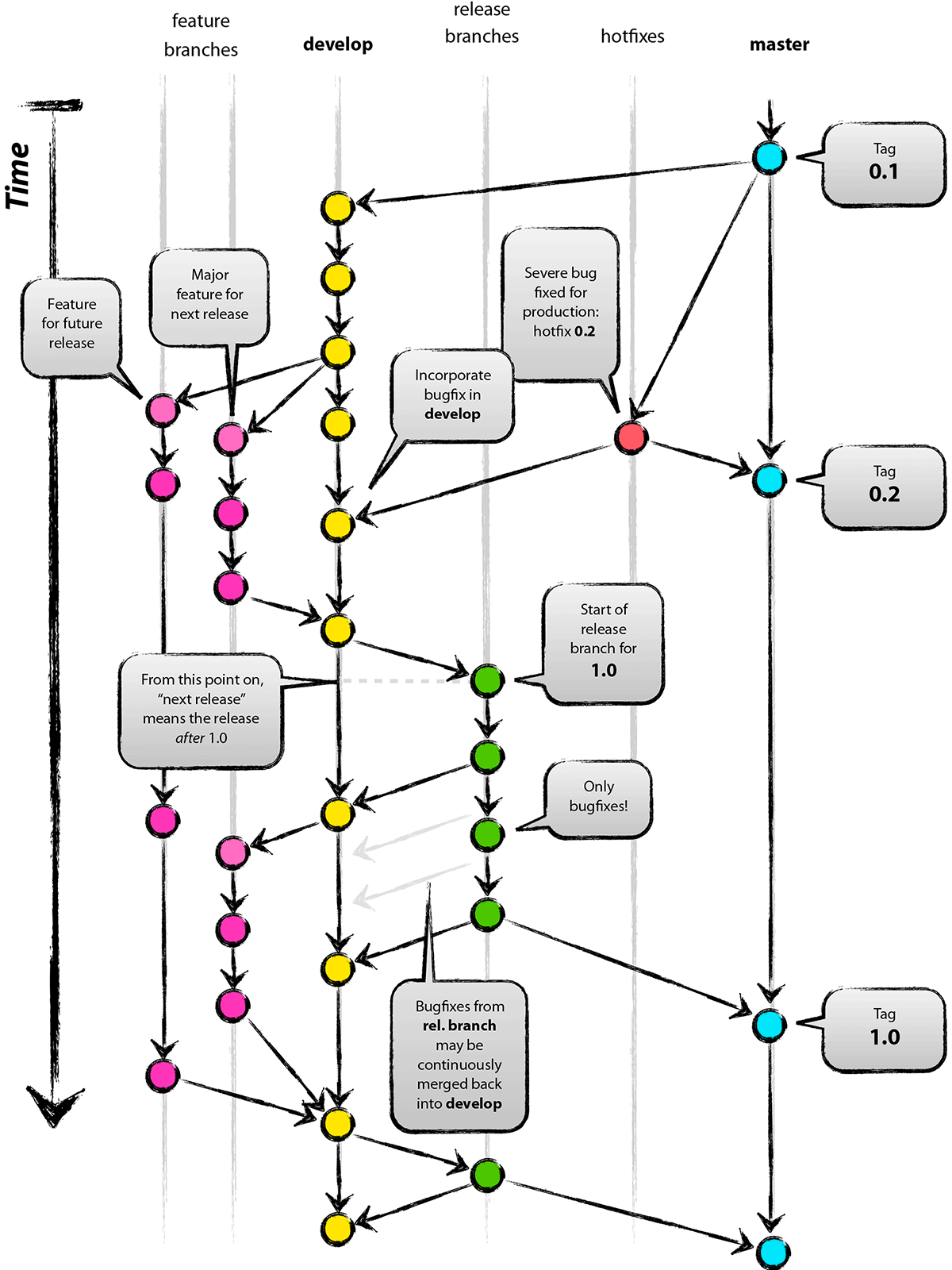
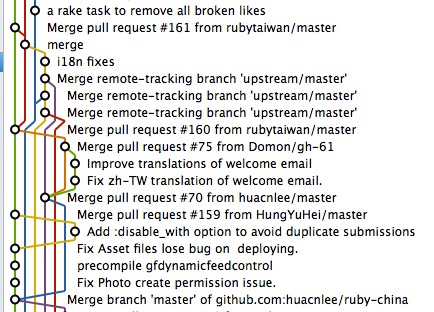
什么是 Lerna?

直接引用官方的一句话描述:

Lerna is a tool that optimizes the workflow around managing multi-package repositories with git and npm.

Lerna 是一个工具,它的主要工作,就是优化基于 gitnpm 工具管理多包(multi-packages)构架项目的工作流。

初始化 Lerna 项目

mkdir catx
cd catx

初始化完成之后,项目目录如下:

.
├── lerna.json         // lerna 配置文件
├── package.json       // npm 包配置文件
└── packages           // 子包

package.json 文件内容如下:

{
  "name": "root",
  "private": true,
  "devDependencies": {
    "lerna": "^3.14.1"
  }
}

这个是当前的根项目,我们需要把里面的 name 属性改成自己根项目的名称,我的叫 catx

lerna.json 文件内容如下:

{
  "packages": [        // 本项目有哪些子包
    "packages/*"       // packages 目录下面的所有包均是
  ],
  "version": "0.0.0"   // 当前版本号
}

新建第一个子包:api

cd packages
mkdir api && cd api
npm init -y

现在整个工程的目录结构如下:

.
├── lerna.json
├── package.json
└── packages
    └── api
        └── package.json

lerna 是如何工作的?

lerna 允许你在 固定版本自主版本 两种方式中任选其一(Fixed or Independent)。

固定模式(Fixed)

简单来说,就是在 lerna.json 配置文件中保存一个 version 号,当你 lerna publish 时, lerna 会检测项目中所有的子包,只要有任何一个子包更新了,那么所有包都会同步更新版本,这是 Babel 项目现在使用的方式,如果有一个子包更新了主版本号,那么所有的子包都会同步更新。

自主模式

与固定模式相对的,自主模式允许你完全自主跟踪每一个子包的版本,包与包之间没有强关联。使用下面的命令初始化自主模式:

./node_modules/.bin/lerna init --independent

此时,再次查看 package.json 文件,内容如下:

{
  "packages": [
    "packages/*"
  ],
  "version": "independent"    // root 下 package.json 的版本号被设置为了 `independent`
}

npm init 执行完成之后,会在当前目录下面生成 package.json 文件,这时,我们经常会使用 npm install package-name 或者 npm install development-required-package-name --save-dev 来安装一些依赖的第三方包,它们分别是运行时依赖和开发时依赖,但是还有一个不太常见的依赖叫 对等依赖,即 peerDependencies,使用 npm install --save-peer 即可添加。

dependencies 依赖

假设我们现在有一个项目的的 package.json 文件如下:

{
  "name": "peer-dependencies-demo",
  "version": "0.0.0",
  "description": "Peer Dependencies Demo",
  "main": "index.js",
  "scripts": {
    "test": "echo \"Error: no test specified\" && exit 1"
  },
  "author": "pantao <ofcrab@gmail.com>",
  "license": "MIT",
  "dependencies": {
    "peer-dependencies-plugin": "^1.0.0"
  }
}

peer-dependencies-plugin 这个模块的 package.json 中有下面这样的依赖:

{
  ...
  "dependencies": {
    "peer-dependencies-plugin-core": "^1.0.0"
  }
  ...
}

安装完成之后,我们的项目目录结构将是下面这样的:

.
├──package.json
├──src
│  └──index.js
└──node_modules
   └──peer-dependencies-plugin
      └──node_modules
         └──peer-dependencies-plugin-core

此时,在 index.js 中,我们可以像下面这样引入 peer-dependencies-plugin

import PeerDependenciesPlugin from 'peer-dependencies-plugin'

但是,却不能像下面这样引用 peer-dependencies-plugin-core

import PeerDependenciesPluginCore from 'peer-dependencies-plugin-core'

这是因为,即使 peer-dependencies-plugin-core 已经安装进了 node_modules 里面的,但是却不在 node_modules 下,而是在他的子目录下的一个模块里面,import 的时候,只会在当前项目根目录的 node_modules 下查找,并不会去查找它的子目录。

所以,如果你在项目里面还要使用 peer-dependencies-plugin-core 的话,你还需要手工的安装对 peer-dependencies-plugin-core 依赖,这个时候,你的项目安装完成之后,目录结构就是下面这样的了:

.
├──package.json
├──src
│  └──index.js
└──node_modules
   └──peer-dependencies-plugin-core
   └──peer-dependencies-plugin
      └──node_modules
         └──peer-dependencies-plugin-core

这势必会靠成很多不必要的麻烦,首当齐冲的就是,你的项目依赖的是 1.0.0,而你依赖的另一个插件却只能支持到 0.0.8,这个时候,导致一个项目里面依赖了两次 peer-dependencies-plugin-core,而且还不是同一个版本。

peerDependencies 的引入

为了解决上面这种问题, peer-dependencies-plugin 在声明对 peer-dependencies-plugin-core 的依赖的时候,设置为 peerDependencies

{
  ...
  "peerDependencies": {
    "peer-dependencies-plugin-core": "^1.0.0"
  }
  ...
}

它会告诉 npm:**如果某个 package 依赖我,那么这个 package 也应该对 peer-dependencies-plugin-core 依赖,这个时候,你 npm install peer-dependencies-plugin 的时候,将得到下面这样的目录:

.
├──package.json
├──src
│  └──index.js
└──node_modules
   └──peer-dependencies-plugin-core
   └──peer-dependencies-plugin

npm2 中,就算当前项目的 package.json 中没有对 peer-dependencies-plugin-core 的依赖,它也会被直接安装进 node_modules 目录下,但是如果你现在使用的是 npm3 ,那么安装完成之后, npm 并不会主动的帮你安装模块的 peerDependencies,但是会发出一个警告,告诉你本次安装是否正确,可能是下面这样的:

peer-dependencies-plugin-core 是一个需要的依赖,但是还没有被安装。

此时,你需要手动的在 package.json 中指定对 peer-dependencies-plugin-core 的依赖。

什么时候使用 peerDependencies

npm 文档中对 peerDependencies 的介绍是:

In some cases, you want to express the compatibility of your package with a host tool or
library, while not necessarily doing a require of this host. This is usually referred to
as a plugin. Notably, your module may be exposing a specific interface, expected and
specified by the host documentation.

大概的意思就是:通常是在插件开发的场景下,你的插件需要某些依赖的支持,但是你又没必要去安装,因为插件的宿主会去安装这些依赖,你就可以用peerDependencies去声明一下需要依赖的插件和版本,如果出问题npm就会有警告来提醒使用者去解决版本冲突问题。

一个组件的文件结构该如何组织?

  • 一个组件放在一个文件夹下面
  • 有一个 index.md 文件,说明组件使用说明及注意事项
  • __test__,每一个组件需要进行单元测试,使用的是 Jest
  • 样式单独的 style 目录,入口名称统一为 index
  • types 目录里面添加了 index.d.ts
button/
├── __test__
│   └── button.test.js
├── index.js
├── index.md
└── style
    └── index.scss

判断当前宿主环境

export const ENV_TYPE = {
  WEAPP: 'WEAPP',
  WEB: 'WEB',
  RN: 'RN',
  SWAN: 'SWAN',
  ALIPAY: 'ALIPAY',
  TT: 'TT'
}

export function getEnv () {
  if (typeof wx !== 'undefined' && wx.getSystemInfo) {
    return ENV_TYPE.WEAPP
  }
  if (typeof swan !== 'undefined' && swan.getSystemInfo) {
    return ENV_TYPE.SWAN
  }
  if (typeof my !== 'undefined' && my.getSystemInfo) {
    return ENV_TYPE.ALIPAY
  }
  if (typeof tt !== 'undefined' && tt.getSystemInfo) {
    return ENV_TYPE.TT
  }
  if (typeof global !== 'undefined' && global.__fbGenNativeModule) {
    return ENV_TYPE.RN
  }
  if (typeof window !== 'undefined') {
    return ENV_TYPE.WEB
  }
  return 'Unknown environment'
}

在做插件开发时,如何导出更优雅?

分别使用 exportexport default,你可以通过一个上下文挂载所有导出,也可以通过解构去导入你想要的指定导出。

export {
  Component, Events, eventCenter, getEnv, ENV_TYPE, render, internal_safe_get, internal_safe_set, internal_inline_style, internal_get_original, noPromiseApis, onAndSyncApis,
  otherApis, initPxTransform
}

export default {
  Component, Events, eventCenter, getEnv, ENV_TYPE, render, internal_safe_get, internal_safe_set, internal_inline_style, internal_get_original, noPromiseApis, onAndSyncApis,
  otherApis, initPxTransform
}

一个逆天的正则

下面是来源于一个叫 js-token 的模块。

/((['"])(?:(?!\2|\\).|\\(?:\r\n|[\s\S]))*(\2)?|`(?:[^`\\$]|\\[\s\S]|\$(?!\{)|\$\{(?:[^{}]|\{[^}]*\}?)*\}?)*(`)?)|(\/\/.*)|(\/\*(?:[^*]|\*(?!\/))*(\*\/)?)|(\/(?!\*)(?:\[(?:(?![\]\\]).|\\.)*\]|(?![\/\]\\]).|\\.)+\/(?:(?!\s*(?:\b|[\u0080-\uFFFF$\\'"~({]|[+\-!](?!=)|\.?\d))|[gmiyus]{1,6}\b(?![\u0080-\uFFFF$\\]|\s*(?:[+\-*%&|^<>!=?({]|\/(?![\/*])))))|(0[xX][\da-fA-F]+|0[oO][0-7]+|0[bB][01]+|(?:\d*\.\d+|\d+\.?)(?:[eE][+-]?\d+)?)|((?!\d)(?:(?!\s)[$\w\u0080-\uFFFF]|\\u[\da-fA-F]{4}|\\u\{[\da-fA-F]+\})+)|(--|\+\+|&&|\|\||=>|\.{3}|(?:[+\-\/%&|^]|\*{1,2}|<{1,2}|>{1,3}|!=?|={1,2})=?|[?~.,:;[\](){}])|(\s+)|(^$|[\s\S])/g

看下面的代码:

const js = `const ENV_TYPE = {
  WEAPP: 'WEAPP',
  WEB: 'WEB',
  RN: 'RN',
  SWAN: 'SWAN',
  ALIPAY: 'ALIPAY',
  TT: 'TT'
}`

const reg = /((['"])(?:(?!\2|\\).|\\(?:\r\n|[\s\S]))*(\2)?|`(?:[^`\\$]|\\[\s\S]|\$(?!\{)|\$\{(?:[^{}]|\{[^}]*\}?)*\}?)*(`)?)|(\/\/.*)|(\/\*(?:[^*]|\*(?!\/))*(\*\/)?)|(\/(?!\*)(?:\[(?:(?![\]\\]).|\\.)*\]|(?![\/\]\\]).|\\.)+\/(?:(?!\s*(?:\b|[\u0080-\uFFFF$\\'"~({]|[+\-!](?!=)|\.?\d))|[gmiyus]{1,6}\b(?![\u0080-\uFFFF$\\]|\s*(?:[+\-*%&|^<>!=?({]|\/(?![\/*])))))|(0[xX][\da-fA-F]+|0[oO][0-7]+|0[bB][01]+|(?:\d*\.\d+|\d+\.?)(?:[eE][+-]?\d+)?)|((?!\d)(?:(?!\s)[$\w\u0080-\uFFFF]|\\u[\da-fA-F]{4}|\\u\{[\da-fA-F]+\})+)|(--|\+\+|&&|\|\||=>|\.{3}|(?:[+\-\/%&|^]|\*{1,2}|<{1,2}|>{1,3}|!=?|={1,2})=?|[?~.,:;[\](){}])|(\s+)|(^$|[\s\S])/g

console.log(JSON.stringify(js.match(reg)))

输出是:

["const"," ","ENV_TYPE"," ","="," ","{","\n  ","WEAPP",":"," ","'WEAPP'",",","\n  ","WEB",":"," ","'WEB'",",","\n  ","RN",":"," ","'RN'",",","\n  ","SWAN",":"," ","'SWAN'",",","\n  ","ALIPAY",":"," ","'ALIPAY'",",","\n  ","TT",":"," ","'TT'","\n","}"]

lerna

A tool for managing JavaScript projects with multiple packages.

一个用户管理具有多包的 JavaScript 项目的工具

我单独研究之后再另起一篇文章说明一下这个,以前一直没找相关的工具,这次从 TaroJS 中看到了,初看很不错。

rollup

这个不多说了,一个不错的选择。

Interface (接口)

在 TypeScript 中,使用 interface (接口)来定义对象的类型,在面向对象语言中,接口是对行为的抽象,而具体如何行动,则需要 class 或者 implement 去实现,在 TypeScript 中,接口可以对 类的一部分行为 进行抽象,也常常用于对 对象的形状(Shape)进行描述

interface Person {
  name: string,
  age: number,
}

const me: Person = {
  name: 'Pan Tao',
  age: 30
}

在上面的示例中,先定义了一个名为 Person 的接口,接着定义了一个常量 me,它的类型是 Person,这样就约束了 me 的形状必须与接口 Person 一致,接口一般首字母大写。

注意:有一些编程语言建议接口的名称前面加上 I 作为前缀,表示这是一个 Interface

当定义了一个变量的接口类型之后,他的属性就不能比定义的多也不能比定义的少,赋值的时候,变量的形状必须和接口的形状保持一致

interface Person {
    name: string;
    age: number;
}

let me: Person = {
    name: 'Pan Tao'
};

上面会报错:

index.ts(6,5): error TS2322: Type '{ name: string; }' is not assignable to type 'Person'.
  Property 'age' is missing in type '{ name: string; }'.
interface Person {
    name: string;
    age: number;
}

let me: Person = {
    name: 'Pan Tao',
    age: 30,
    gender: 'male'
};

上面会报错:

// index.ts(9,5): error TS2322: Type '{ name: string; age: number; gender: string; }' is not assignable to type 'Person'.
//   Object literal may only specify known properties, and 'gender' does not exist in type 'Person'.

可选属性与任意属性以及只读属性

有时候我们希望不要完全匹配,那么就可以使用可选属性或者任意属性

可选属性

interface Person {
  name: string;
  age?: number;
}

const me: Person = {
  name: 'Pan Tao'
}

在定义一个属性是,如果属性名后面加一个 ? 号,则表示该属性是可选的,在定义对象时,可以提供也可以不提供

任意属性

interface Person {
  name: string;
  age?: number;
  [propName: string]: any;
}


const me: Person = {
    name: 'Pan Tao',
    age: 30,
    gender: 'male'
};

const you: Person = {
  name: 'Name'
}

[propName: string]: any; 定义了属性名为 string 类型,值可为任意类型的属性。

如果我们给任意属性的值定义了类型,那么所有确定属性和可选属性的值类型也必须是任意属性值类型的子集

interface Person {
    name: string;
    age?: number;
    [propName: string]: string;
}

const me: Person = {
    name: 'Pan Tao',
    age: 30,
    gender: 'male'
};

上面的代码会报错:

// index.ts(3,5): error TS2411: Property 'age' of type 'number' is not assignable to string index type 'string'.
// index.ts(7,5): error TS2322: Type '{ [x: string]: string | number; name: string; age: number; gender: string; }' is not assignable to type 'Person'.
//   Index signatures are incompatible.
//     Type 'string | number' is not assignable to type 'string'.
//       Type 'number' is not assignable to type 'string'.

只读属性

interface Person {
    readonly id: number;
    name: string;
    age?: number;
    [propName: string]: any;
}

const me: Person = {
    id: 1,
    name: 'Pan Tao',
    gender: 'male'
};

tom.id = 2;

id 是只读属性,只能在创建的时候被赋值,之后不再允许被修改:

// index.ts(14,5): error TS2540: Cannot assign to 'id' because it is a constant or a read-only property.
注意,只读的约束存在于第一次给对象赋值的时候,而不是第一次给只读属性赋值的时候。

描述一个函数

interface 可以像下面这样描述一个函数:

interface Person {
    readonly id: number;
    name: string;
    age?: number;
    [propName: string]: any;
}

interface CreatePerson {
  (name: string, age: number) => Person;
}

extends

interface Person {
  readonly id: number;
  name: string;
  age?: number;
  [propName: string]: any;
}

interface Programmer extends Person {
  skills: Array<string>;
}

Type (类型)

区别

初始化 npm 项目

yarn init

添加依赖

yarn add hapi

添加开发依赖

要在开发中使用 TypeScrip,同时至少需要有一个工具,可以一直监听项目文件的变更,并实时的将变更更新至启动的服务中,我选择使用 Nodemon,首先添加以下几个开发依赖

yarn add typescript -D
yarn add nodemon -D

接下来,我们需要为 nodehapi 安装类型定义库:

yarn add @types/node -D
yarn add @types/hapi -D

安装完成之后, package.json 文件看起来像下面这样的:

{
  "name": "hapiserver",
  "version": "0.0.1",
  "description": "API server",
  "main": "index.js",
  "author": "Your Name",
  "license": "MIT",
  "dependencies": {
    "hapi": "^18.1.0"
  },
  "devDependencies": {
    "@types/hapi": "^18.0.2",
    "@types/node": "^12.0.2",
    "nodemon": "^1.19.0",
    "typescript": "^3.4.5"
  }
}
注意:你的 dependenciesdevDependencies 配置中,版本号可能与我的不同。

配置 TypeScript

设计项目文件目录结构

在项目的根目录下,创建一个名为 src 的目录,用于包含系统的所有源代码文件,接着,创建一个名为 dist 的目录,用于保存由 typescript 编译后的 javascript 文件。

注意:文件结构并不是强制的,你可以完全按照自己的习惯和规范来进行
.
├── dist
├── node_modules
├── package.json
├── src
└── yarn.lock

tsconfig.json

TypeScript 会查询名为 tsconfig.json 的配置文件来查找项目的入口文件以及编译设置,关于它的详细使用说明,可以从 https://www.typescriptlang.org/docs/handbook/tsconfig-json.html 查阅,在这里,我们先填入以下内容:

{
  "compilerOptions": {
    "outDir": "./dist",
    "allowJs": false,
    "target": "es6",
    "sourceMap": true,
    "module": "commonjs",
    "moduleResolution": "node"
  },
  "include": ["./src/**/*"],
  "exclude": ["node_modules"]
}

tsconfig.json 文件中,我们定义了 outDir 的值为 ./dist,它告诉编译器,编译后的输出目录为 ./dist 文件夹,现在可以直接在项目根目录执行以下代码,即可编译 src 目录下的 TypeScript 代码至 dist 目录下的 JavaScript 文件了。

node_modules/typescript/bin/tsc

用 TypeScript 开发 Hapi 服务应用

src 目录下,创建一个名为 server.ts 的文件,内容如下:

import * as hapi from "hapi";

// 创建一个服务器,监听 `localhost` 上的 `8000` 商品
const server: hapi.Server = new hapi.Server({
  host: "localhost",
  port: 8000
});

// 添加路由
server.route({
  method: "GET",
  path: "/hello",
  handler: function(request, h) {
    return "Hello! TypeScript!";
  }
});

// 启动服务
async function start() {
  try {
    await server.start();
  } catch (err) {
    console.log(err);
    process.exit(1);
  }
  console.log("Server running at:", server.info.uri);
}

// 不要忘记启动服务
start();

由于我们的代码是由 TypeScript 写的,所以现在还没有办法直接运行,需要先将其编译为 JavaScript 代码之后再运行:

使用下面的命令编译代码:

node_modules/typescript/bin/tsc

编译完成之后,将得到下面这样的两个文件:

dist
├── server.js
└── server.js.map

此时,执行下面的代码,启动服务:

node dist/server.js

启动成功之后,终端将显示:

Server running at: http://localhost:8000

使用 curl 测试一下我们的服务:

$ curl -i http://localhost:8000/hello
HTTP/1.1 200 OK
content-type: text/html; charset=utf-8
cache-control: no-cache
content-length: 18
accept-ranges: bytes
Date: Fri, 17 May 2019 01:58:50 GMT
Connection: keep-alive

Hello! TypeScript!

已经启动成功了。

完成所有配置

我们总不能每改一次代码,都手工执行一次编译,再重新启动服务,可以在 package.json 中添加两个命令:

{
  ...
  "scripts": {
    "start": "./node_modules/nodemon/bin/nodemon.js -e ts  --exec \"yarn run compile\"",
    "compile": "tsc && node ./dist/server.js"
  },
  ...
}

现在,只需要在项目根目录下执行以下代码,即可启动一个实时编译代码并自动重新服务的开发环境了:

yarn start

它的作用是:nodemon 启动一个服务,监听文件的变更,当有任何文件变更之后,执行 yarn run compile 命令(即执行:tsc && node ./dist/server.js,以重启服务。

初始化一个应用

使用 react-native init AppName 命令初始化一个 React Native 应用

react-native init Chongai
mv Chongai chongai-app
cd chongai-app
我习惯性的使用 CamelCase 规范命名 App 名称,同时将文件夹改为 foobar-app 方式,上面那一行 mv 命令不一定都需要,我是为了保证项目的 git 地址没有大写字母

设置 git

git init
git remote add origin git@git.domain.com:namespace/project-name.git
git push -u origin master

安装 PrettierESLint

在本地项目中安装开发依赖

yarn add -D eslint prettier
yarn add -D eslint-config-airbnb
npx install-peerdeps --dev eslint-config-airbnb
yarn add -D eslint-config-prettier eslint-plugin-prettier

添加 .eslintrc.json 文件:

{
  "extends": ["airbnb", "prettier"],
  "plugins": ["prettier"],
  "rules": {
    "prettier/prettier": ["error"]
  }
}

添加 .prettierrc

{
  "printWidth": 100,
  "singleQuote": true
}

配置编辑器

我使用的是 VSCode:

分别安装 ESLintPrettier 插件。

设置配置项目:

{
  ...
  "editor.formatOnSave": true
  ...
}

安装常用库

yarn add react-native-gesture-handler
react-native link react-native-gesture-handler

yarn add react-navigation

yarn add react-native-video
react-native link react-native-video

yarn add react-native-camera
react-native link react-native-camera

yarn add react-native-device-info
react-native link react-native-device-info

yarn add react-native-image-picker
react-native link react-native-image-picker

早期的身份证号码称之为社会保障号,为15位,1999年开始,更名为公众民份证号码,即第二代身份证号码,为18位,且终身不变。

公民身份证号码是特征组合码,由前17位数字本体码和最后一位数字校验码组成,排列顺序从左至右依次为六位数字地址码,八位数字出生日期码,三位数字顺序码和一位数字校验码。

地址码: 表示编码对象常住户口所在县(市、旗、区)的行政区划代码。对于新生儿,该地址码为户口登记地行政区划代码。需要没说明的是,随着行政区划的调整,同一个地方进行户口登记的可能存在地址码不一致的情况。行政区划代码按GB/T2260的规定执行。

出生日期码:表示编码对象出生的年、月、日,年、月、日代码之间不用分隔符,格式为YYYYMMDD,如19880328。按GB/T 7408的规定执行。原15位身份证号码中出生日期码还有对百岁老人特定的标识,其中999、998、997、996分配给百岁老人。

顺序码: 表示在同一地址码所标识的区域范围内,对同年、同月、同日出生的人编定的顺序号,顺序码的奇数分配给男性,偶数分配给女性。

校验码: 根据本体码,通过采用ISO 7064:1983,MOD 11-2校验码系统计算出校验码。算法可参考下文。前面有提到数字校验码,我们知道校验码也有X的,实质上为罗马字符X,相当于10。

15 位与 18 位身份证号码的差异

  • 出生日期码:15位身份证号码中出生日期码为6位,其中年份代码仅有2位,如590328,代表1959年生。
  • 校验码:15位身份证号码中无校验位。

校验码算法

将本体码各位数字乘以对应加权因子并求和,除以11得到余数,根据余数通过校验码对照表查得校验码。

加权因子如下:

位置序号1234567891011121314151617
加权因子7910584216379105842

校验码:

余数012345678910
校验码10X98765432

比如本体码为 11010519491231002

  1. 各位数与对应加权因子乘积求和:

    1 * 7 + 1 * 9 + 0 + 10 + ... + 0 * 2 = 167
  2. 对求和进行除 11 得余数 167 % 11 = 2
  3. 根据余数 2 对照校验码得 X

因此完整身份证号码为: 11010519491231002X